fmdtools.define.container
Package defining system variables other base constructs.
The containers subpackage provides the elemental building puzzle pieces needed (i.e., containers for holding states, modes, etc.) to develop simulations, shown below.
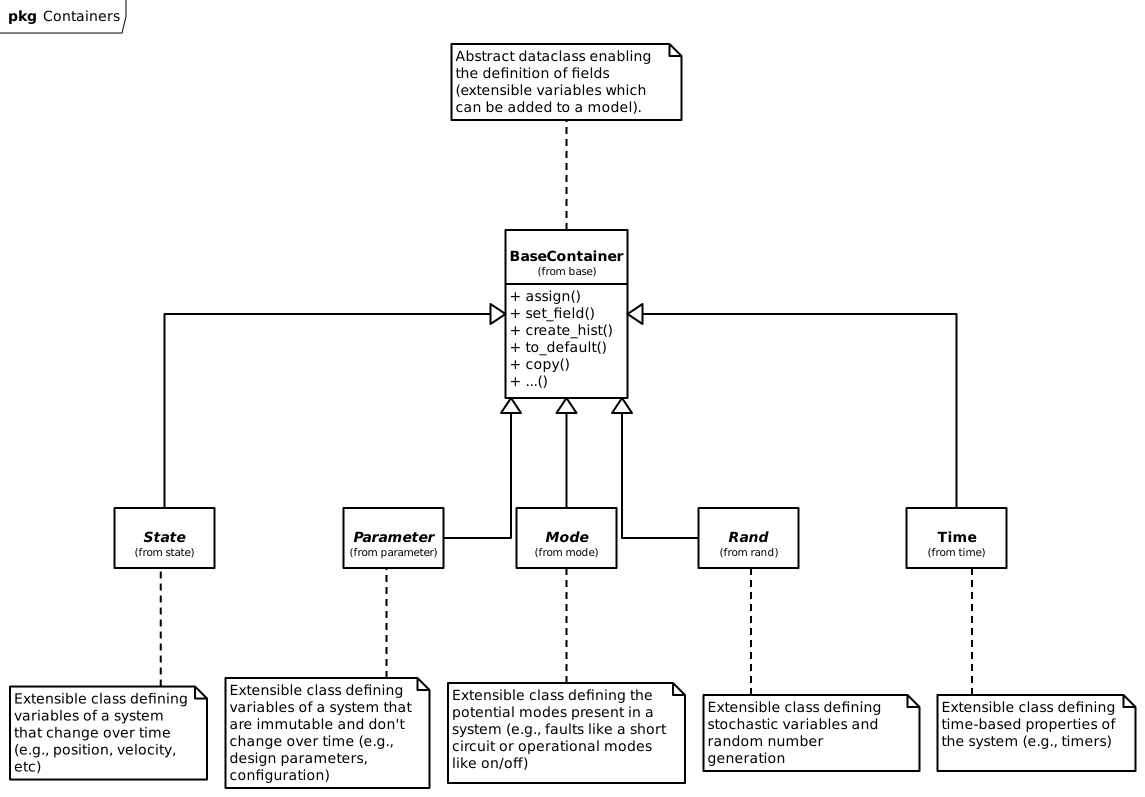
Container classes in fmdtools and their inheritance.
These classes are provided in the following modules:
Defines |
|
Defines |
|
Defines |
|
Defines |
|
Defines |
|
Defines |
fmdtools.define.container.base
Defines BaseContainer class which other containers inherit from.
- class fmdtools.define.container.base.BaseContainer(*args, check_docs=False, get_fields=True, set_type=True, **kwargs)
Bases:
dataobjectBase container class.
A container is a dataobject (from the recordclass library) that fulfills a specific role in a block. This class inherits from dataobject for low memory footprint and has a number of methods for making attribute assignment/copying/tracking easier.
Containers also have basic functionality for importing/exporting from json. e.g.,
Examples
>>> ex = ExContainer()
>>> ex
ExContainer(x=1.0, y=2.0)
>>> ex.x = 3.0
>>> values = ex.tojson()
>>> values
'{"x": 3.0, "y": 2.0}'
>>> ex_new = ExContainer.fromjson(values)
>>> ex_new
ExContainer(x=3.0, y=2.0)
>>> ex_new = ExContainer.fromdict({'a':5, 'b': 7}, x="a")
>>> ex_new
ExContainer(x=5.0, y=2.0)
>>> ex_new.save(filename="ex_container.json")
>>> ex.assign("ex_container.json")
>>> ex
ExContainer(x=5.0, y=2.0)
>>> ex2 = ExContainer.load("ex_container.json", y="x", x="y", delete=True)
>>> ex2
ExContainer(x=2.0, y=5.0)
>>> jstr = ex2.tojson()
>>> jstr
'{"x": 2.0, "y": 5.0}'
>>> ex.assign(jstr)
>>> ex
ExContainer(x=2.0, y=5.0)
>>> ExContainer.fromjson(jstr)
ExContainer(x=2.0, y=5.0)
- asdict(*fields, jsonable=False, exclude=[], as_copy=False, **kwargs)
Return fields as a dictionary.
- assign(obj, *fields, as_copy=True, **fielddict)
Set the same-named values of the current object to those of another.
- Parameters:
obj (Object/str/dict) – Object to assign values from
*fields (fields to assign)
as_copy (bool,) – set to True for dicts/sets to be copied rather than referenced
**fielddict (kwargs) – Mapping for arguments that don’t match
Examples
Further arguments specify which values. e.g.,:
>>> p1 = ExContainer(x=0.0, y=0.0)
>>> p2 = ExContainer(x=10.0, y=20.0)
>>> p1.assign(p2, 'x', 'y')
>>> p1.x
10.0
>>> p1.y
20.0
Can also be used to assign list values to a variable, e.g.,:
>>> p1.assign([3.0,4.0], 'x', 'y')
>>> p1.x
3.0
>>> p1.y
4.0
Can also provide kwargs in case value names don’t match, e.g.,:
>>> p1.assign(p2, x='y', y='x')
>>> p1.x
20.0
>>> p1.y
10.0
Containers can also be assigned from json (including json files): >>> p1.assign(‘{“x”: 1.0, “y”: 2.0}’, “x”, “y”) >>> p1 ExContainer(x=1.0, y=2.0)
- base_type()
Return fmdtools type of the model class.
- check_role(roletype, rolename)
Check that the container will be given the correct name for its class.
- The correct container-names correspond to the role for the class embody, e.g.:
State : s Rand : r Mode : m Parameter : p SimParam : sp
- copy(**kwargs)
Create an independent copy of the container with the same attributes.
- Returns:
cop (BaseContainer) – Copy of the container with the same attributes as self.
kwargs (kwargs) – Attributes of the container to overwrite with keyword arguments
Examples
>>> ex = ExContainer(4.0, 5.0)
>>> ex2 = ex.copy()
>>> ex2
ExContainer(x=4.0, y=5.0)
>>> ex_nest = ExNestContainer(ex2, 40.0)
>>> ex_nest.copy(e1={'x': 6.0})
ExNestContainer(e1=ExContainer(x=6.0, y=5.0), z=40.0)
- create_hist(timerange=None, track=None, default_str_size='<U20')
Create a History corresponding to the State.
- Parameters:
timerange (iterable, optional) – Time-range to initialize the history over. The default is None.
track (list/str/dict, optional) – argument specifying attributes for :func:`get_sub_include’. The default is None.
- Returns:
hist – History of fields specified in track.
- Return type:
Examples
>>> nest_hist = ExNestContainer().create_hist()
>>> nest_hist
e1:
--x:                            array(1)
--y:                            array(1)
z:                              array(1)
>>> nest_hist.e1.x
[1.0]
- create_repr(with_classname=True, fields=['all'], one_line=True, with_name=False)
Create repr-friendly string for container.
- default_track = 'all'
- classmethod fromdict(datadict, **mapping)
Load from a dict.
- classmethod fromjson(data, **mapping)
Load from json string.
- get_code(source)
Get the code defining the Container.
- get_field_dict(obj, *fields, **fielddict)
Get dict of values from object corresponding to Container fields.
- Parameters:
obj (dataobject, list, tuple, str (json or json filename) or ndarray) – Object to get field dictionary from.
*fields (str) – Names of corresponding fields (in self.__fields__)
**fielddict – Mapping of fields in obj corresponding to fields in self.
- Returns:
field_dict – Dictionary of fields and their values.
- Return type:
dict
Examples
>>> ex = ExContainer(1.0, 2.0)
>>> ex.get_field_dict([5.0])
{'x': 5.0}
>>> ex2 = ExContainer(3.0, 4.0)
>>> ex.get_field_dict(ex2)
{'x': 3.0, 'y': 4.0}
>>> ex.get_field_dict({'x': 3.0, 'z': 40.0}, x='x', y='z')
{'x': 3.0, 'y': 40.0}
>>> ex.get_field_dict(ex)
{'x': 1.0, 'y': 2.0}
- get_fields(*fields, default='all')
Get set of fields from the container.
- Parameters:
*fields (str) – Attributes to track. If ‘all’, gets all fields, if ‘default’, gets fields defined in self.default (where default is the name of default field list) if ‘none’, tracks none of the fields. if no fields provided, defaults to the default parameter.
- get_memory()
Get approximate memory impact of dataobject and its fields.
- get_pref_attrs(prefix, space='_')
Return dict of Container attributes with ‘prefix_’ as the var name.
- get_track(track)
Get tracking params for a given dataobject (State, Mode, Rand, etc).
- Parameters:
track (track) – str/tuple. Attributes to track. ‘all’ tracks all fields ‘default’ tracks fields defined in default_track for the dataobject ‘none’ tracks none of the fields
- Returns:
track – fields to track
- Return type:
tuple
- get_true_field(fieldname, *args, **kwargs)
Get the value that will be set to fieldname given *args and **kwargs.
- get_true_fields(*args, force_kwargs=False, **kwargs)
Resolve the args to pass given certain defaults, *args and **kwargs.
NOTE: must be used for pickling, since pickle passes arguments as *args and not **kwargs.
- get_typename()
Containers are typed as containers unless specified otherwise.
- init_hist_att(hist, att, timerange, track, str_size='<U20')
Initialize a field in the history.
- classmethod load(filename, delete=False, **mapping)
Load values from file.
- reset()
- return_mutables()
Return mutable aspects of the container.
- rolename = 'x'
- save(filename='', fields=(), **mapping)
Save values as json file.
- set_arg_type(*args, **kwargs)
Set Parameter field input to the predetermined field type.
e.g., if the input to parameter is int for a float field, this converts it to a float in initialization.
- set_field(fieldname, value, as_copy=True)
Set the field of the container to the given value.
- Parameters:
fieldname (str) – Name of the field.
value (value) – Value to set the field to.
as_copy (bool, optional) – Whether to copy value. The default is True.
Examples
>>> ex_nest = ExNestContainer()
>>> ex_inside = ExContainer(3.0, 4.0)
>>> ex_nest.set_field('e1', ex_inside)
>>> ex_nest
ExNestContainer(e1=ExContainer(x=3.0, y=4.0), z=20.0)
- to_default(*fieldnames)
Reset given fields to their own defaults, independent of request order.
Examples
>>> ex = ExContainer(3.0, 4.0)
>>> ex.to_default()
>>> ex
ExContainer(x=1.0, y=2.0)
>>> ex = ExContainer(4.0, 5.0)
>>> ex.to_default('x')
>>> ex
ExContainer(x=1.0, y=5.0)
- tojson(fields=(), **mapping)
Create json representation of current json values.
- class fmdtools.define.container.base.ExContainer(x: float = 1.0, y: float = 2.0)
Bases:
BaseContainerCreate class ExContainer instance
- x: float
- y: float
- class fmdtools.define.container.base.ExNestContainer(e1: ExContainer = ExContainer(x=1.0, y=2.0), z: float64 = 20.0)
Bases:
BaseContainerCreate class ExNestContainer instance
- e1: ExContainer
- z: float64
- fmdtools.define.container.base.check_container_pick(container, *args, **kwargs)
Check that a given container class or object will pickle.
Examples
>>> ex = ExContainer()
>>> check_container_pick(ex)
True
>>> check_container_pick(ExContainer, x=2.0)
True
>>> check_container_pick(ExContainer, 5.0, 40.0)
True
fmdtools.define.container.mode
The following template shows the basic syntax to use to define modes:
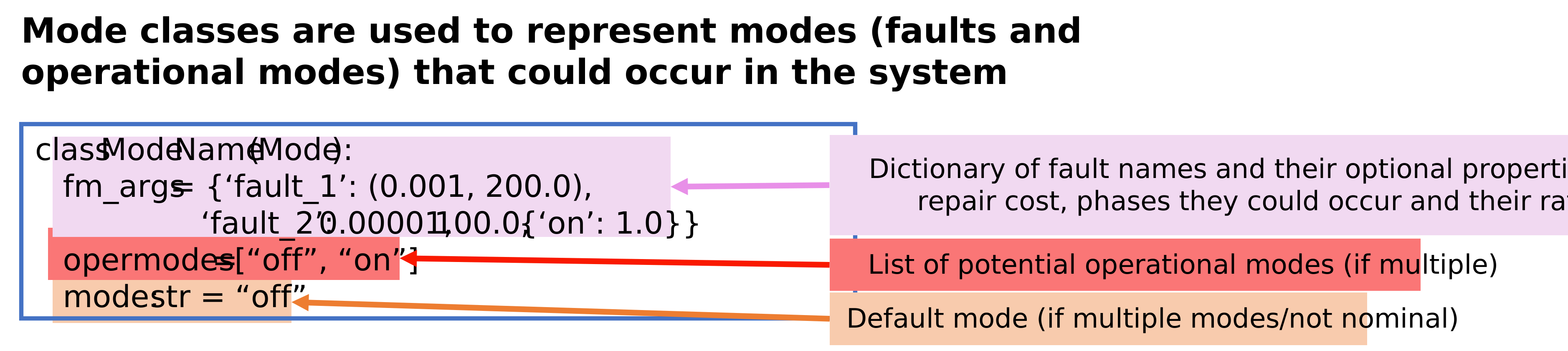
Mode class template/example.
Defines Mode class for defining (faulty and otherwise) mode s.
Has classes:
Fault: Class for defining fault parametersMode: Class for defining the mode property (and associated probability model) held in Blocks.
- class fmdtools.define.container.mode.ExampleMode(*args, **kwargs)
Bases:
ModeExample mode for testing/docs.
- exclusive = True
- fault_low: dict
- fault_no_charge = Fault(prob=1e-05, cost=100.0, phases=(('standby', 1.0),), disturbances=(), units=sim)
- fault_short = (1e-05, 100, (('supply', 1.0),))
- faults: set
- mode: str
- opermodes = ('supply', 'charge', 'standby')
- sub_faults: bool
- class fmdtools.define.container.mode.Fault(*args, failrate=1.0, **kwargs)
Bases:
BaseContainerStores Default Attributes for individual fault modes.
Fields
- probfloat
Mode probability or rate per operation
- costfloat
Individual mode cost (e.g., of repair)
- phasestuple
Opportunity vector mapping phases of operation to relative probability. i.e., phase_probability = Fault.prob * Fault.phases[phase] Has format (‘phasename1’, value, ‘phasename2’, value2)
- disturbancestuple
Disturbances caused by the fault to aspect(s) of the containing simulable. e.g. (‘s.x’, 1.0, ‘s.y’, 2.0)
- unitsstr
Units on probability. Can be a unit of continuous (‘sec’, ‘min’, ‘hr’, ‘day’) or discrete (‘sim’) time. Default is ‘sim’.
- calc_rate(time, phasemap={}, sim_time=1.0, sim_units='hr', weight=1.0)
Calculate the rate of a given fault mode.
- Parameters:
time (float) – Time the fault will be injected.
phasemap (PhaseMap, optional) – Map of phases/modephases that define operations the mode will be injected during (and maps to the opportunity vector phases). The default is {}.
sim_time (float, optional) – Duration of the simulation. Used to determine fault exposure time when time-units (‘sec’, ‘min’, etc) define the fault rate. The default is 1.0.
sim_units (float, optional) – Simulation time units. Used to determine fault exposure time when time-units define the fault rate. The default is ‘hr’.
weight (float, optional) – Weight for the fault/scenario (e.g., for multiple scens.). The default is 1.
- Returns:
rate – Calculated rate of the scenario with the given information.
- Return type:
float
Examples
>>> # Calculating the rate of a mode in the 'on phase':
>>> from fmdtools.analyze.phases import PhaseMap
>>> pm = PhaseMap({'on': [0, 5], 'off': [6, 10]})
>>> exfault = Fault(prob=0.5, phases = (('on', 0.9,), ('off', 0.1),), units='hr')
>>> rate = exfault.calc_rate(4, pm, sim_time=10.0, sim_units='min')
>>> # note that this rate is the same as what we would calculate:
>>> manual_calc = 0.5 * 6 * 0.9 / 60
>>> bool(manual_calc == rate)
True
>>> rate_off = exfault.calc_rate(7, pm, sim_time=10.0, sim_units='min')
>>> # note that the interval for off (6-10) is 5 while (0-5) is 6
>>> manual_calc_off = 0.5 * 5 * 0.1 / 60
>>> bool(manual_calc_off == rate_off)
True
- cost: float64
- disturbances: tuple
- phases: tuple
- prob: float64
- units: str_
- classmethod valid_fault(fault)
Check if the external fault is a valid fault (has same keys).
- class fmdtools.define.container.mode.HumanErrorMode(*args, **kwargs)
Bases:
ModeMode for Human Errors using HEART-based model.
Overall failrate of human error determined by given:
- gtpfloat
Generic task probability
- epc_XXtuple/list
Error producing condition factors. May be specified as performance shaping factors or tuple (factor, effect proportion).
Examples
>>> class ExHMode(HumanErrorMode):
...     gtp : float = 0.01
...     epc_1 : tuple = (2, 0.5)
>>> exh = ExHMode()
>>> exh.failrate
np.float64(0.015)
>>> class ExHMode2(HumanErrorMode):
...     gtp : float = 0.01
...     epc_1 : float = 2.0
...     epc_2 : float = 3.0
>>> exh2 = ExHMode2()
>>> exh2.failrate
np.float64(0.06)
- calc_he_rate()
Calculate self.failrate based on a human error probability model.
This model uses an overall generic task probability (set by self.gtp) as well as error producing conditions (EPCs) to determine the overall failure rate of the task.
- failrate: float64
- faults: set
- gtp = 1.0
- sub_faults: bool
- class fmdtools.define.container.mode.Mode(*args, **kwargs)
Bases:
BaseContainerClass for defining the mode property (and probability model) held in Blocks.
Mode is meant to be inherited in order to define the specific faults related to a given Block.
Class Variables
- opermodestuple
Names of non-faulty operational modes.
- failratefloat
Overall failure rate for the block. The default is 1.0. Note that if a failrate is provided, the prob argument in faultparams is a conditional probability (e.g. Fault.prob = Mode.failrate * Mode.faultparams[‘mode’][‘prob’]).
- probtypestr, optional
Type of probability in the probability model, a per-time ‘rate’ or per-run ‘prob’. The default is ‘rate’.
- exclusiveTrue/False
Whether fault modes are exclusive of each other or not. Default is False (i.e. more than one can be present).
- default_xxfloat
Default values for Fault fields (e.g., prob, phases, etc)
These fields are then used in simulation and elsewhere.
Fields
- faultsset
Set of faults present (or not) at any given time
- sub_faultsbool
Whether objects contained by the object are faulty.
- modestr
Name of the current mode. the default is ‘nominal’
- faultmodesdict
Dictionary of
Faultdefining possible fault modes and their properties
Examples
>>> class ExampleMode(Mode):
...    fault_no_charge = Fault(1e-5, 100, (('standby', 1.0),))
...    fault_short = (1e-5, 100, (('supply', 1.0),))
...    opermodes = ("supply", "charge", "standby")
...    exclusive = True
...    mode: str = "standby"
>>> exm = ExampleMode()
>>> exm.mode
'standby'
>>> exm.any_faults()
False
>>> exm.get_faults()
{'no_charge': Fault(prob=1e-05, cost=100.0, phases=(('standby', 1.0),), disturbances=(), units=sim), 'short': Fault(prob=1e-05, cost=100.0, phases=(('supply', 1.0),), disturbances=(), units=sim)}
>>> exm.to_fault("short")
>>> js = exm.tojson()
>>> exm2 = ExampleMode.fromjson(js)
>>> exm2.mode
'short'
- add_fault(*faults)
Add fault (a str) to the block.
Dictionary updates to stored Fault objects create new definitions rather than assigning into their read-only fields. Omitted fields are retained.
- Parameters:
*fault (str(s)) – name(s) of the fault to add to the black
Examples
>>> exm = ExampleMode()
>>> exm.get_fault('low')
Fault(prob=1.0, cost=0.0, phases=(), disturbances=(('s.x', 20.0),), units=sim)
>>> exm.add_fault(dict(low={'disturbances': {'s.x': 40.0}}))
>>> exm
ExampleMode(faults={'low'}, sub_faults=False, fault_low={'disturbances': {'s.x': 40.0}}, mode='low')
>>> exm.get_fault('low')
Fault(prob=1.0, cost=0.0, phases=(), disturbances=(('s.x', 40.0),), units=sim)
- any_faults()
Check if the block has any fault modes.
- base_type()
Return fmdtools type of the model class.
- check_faults_possible(*faults)
Raise exception if any of the faults not a valid defined fault mode.
- create_repr(fields=['mode', 'faults', 'sub_faults'], **kwargs)
Limit default repr to relevant fields.
- default_track = ('mode', 'faults', 'sub_faults')
- exclusive = False
- failrate = 1.0
- faults: set
- get_all_faultnames()
Get all names of faults.
- get_fault(faultname, **kwargs)
Get the Fault object associated with the given faultname.
Explicit keyword overrides also apply to preconstructed Fault objects, returning a new object without modifying the stored definition. With no overrides, a preconstructed Fault is returned unchanged.
- Parameters:
faultname (str) – Name of the fault (if defined as a part of the mode at value fault_name). Can also be parameters of the fault.
- Returns:
fault – Fault container with given fields.
- Return type:
Examples
>>> exm = ExampleMode()
>>> exm.get_fault('short')
Fault(prob=1e-05, cost=100.0, phases=(('supply', 1.0),), disturbances=(), units=sim)
>>> exm.get_fault('short', prob=0.1)
Fault(prob=0.1, cost=100.0, phases=(('supply', 1.0),), disturbances=(), units=sim)
- get_fault_disturbances(*faults)
Get all disturbances caused by present (or specified) faults.
- get_faults(*faults)
Get Fault objects for all associated faults.
- has_fault(*faults)
Check if the block has fault (a str).
- Parameters:
*faults (strs) – names of the fault to check.
- in_mode(*modes)
Check if the system is in a given operational mode.
- Parameters:
*modes (strs) – names of the mode to check
- init_hist_att(hist, att, timerange, track, str_size='<U20')
Add field ‘att’ to history. Accommodates faults and mode tracking.
- mode = 'nominal'
- no_fault(fault)
Check if the block does not have fault (a str).
- Parameters:
fault (str) – name of the fault to check.
- opermodes = ('nominal',)
- remove_any_faults(opermode=False, warnmessage=False)
Reset fault mode to nominal and returns to the given operational mode.
- Parameters:
opermode (str (optional)) – operational mode to return to when the fault mode is removed
warnmessage (str/False) – Warning to give when performing operation. Default is False (no warning)
- remove_fault(fault_to_remove, opermode=False, warnmessage=False)
Remove fault in the set of faults and returns to given operational mode.
- Parameters:
fault_to_replace (str) – name of the fault to remove
opermode (str (optional)) – operational mode to return to when the fault mode is removed
warnmessage (str/False) – Warning to give when performing operation. Default is False (no warning)
- replace_fault(fault_to_replace, fault_to_add)
Replace fault_to_replace with fault_to_add in the set of faults.
- Parameters:
fault_to_replace (str) – name of the fault to replace
fault_to_add (str) – name of the fault to add in its place
- return_mutables()
Return mutable aspects of the container.
- rolename = 'm'
- set_mode(mode)
Set a mode in the block.
- Parameters:
mode (str) – name of the mode to enter.
- sub_faults: bool
- to_fault(fault)
Move from the current fault mode to a new fault mode.
- Parameters:
fault (str) – name of the fault mode to switch to
fmdtools.define.container.state
Defines State class for representing variables that change over time.
State classes are used to represent mutables properties of the system that change over time.
State classes are extended and deployed by the user, as shown below:
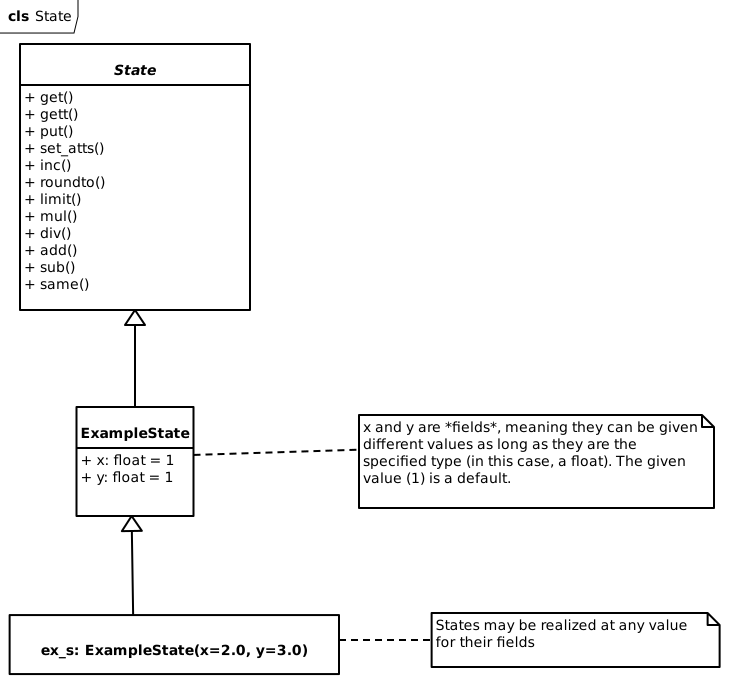
The following template shows the basic syntax used to define states:
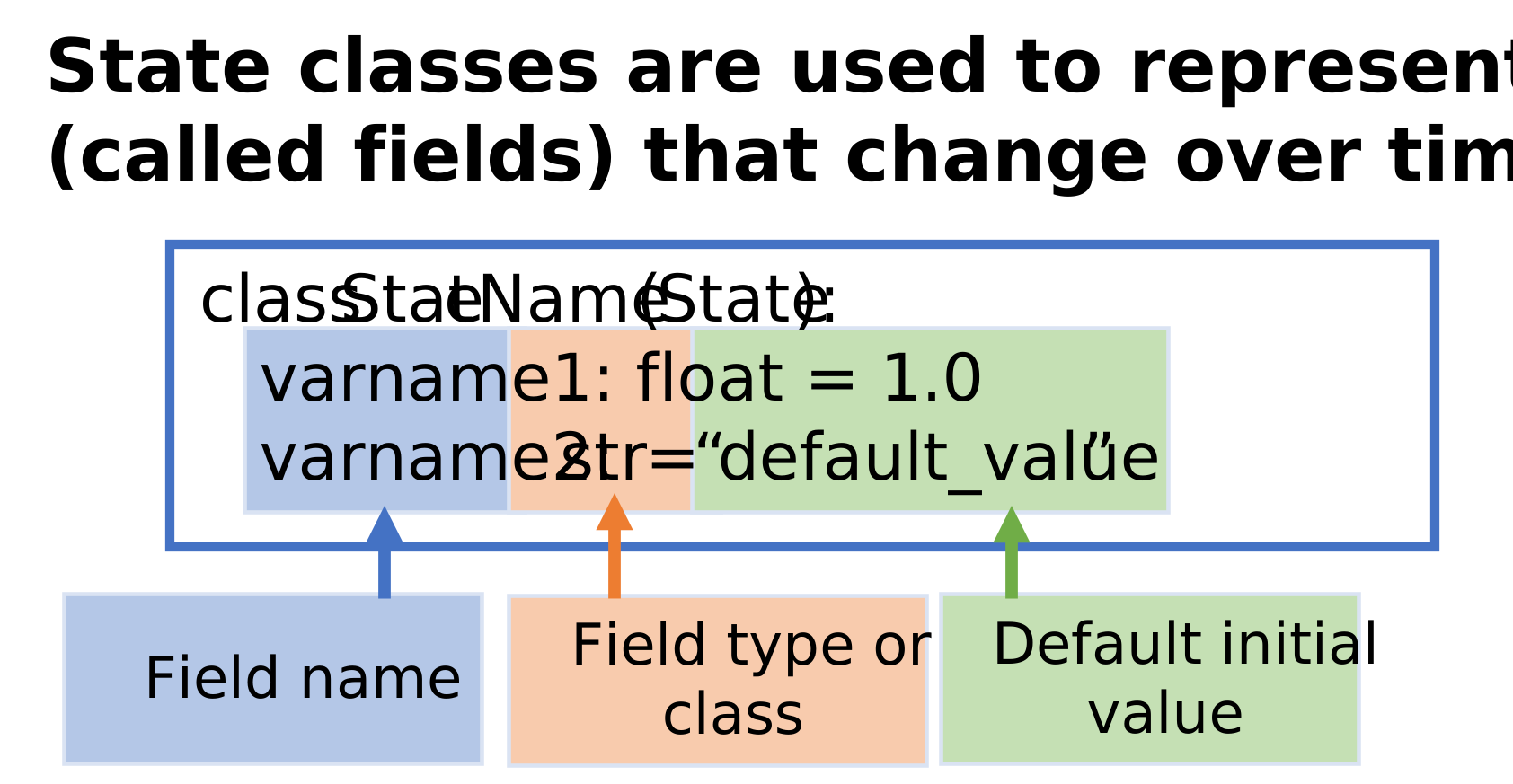
State class template/example.
- class fmdtools.define.container.state.State(*args, check_docs=False, get_fields=True, set_type=True, **kwargs)
Bases:
BaseContainerClass for working with model states.
States which are variables in the model which change over time.
State is meant to be extended in the model definition object to add the corresponding field related to a simulation, e.g.,
>>> class ExampleState(State):
...     x : np.float64=1.0
...     y : np.float64=1.0
Creates a class point with fields x and y which are tagged as floats with default values of 1.0.
Instancing State gives normal read/write access, e.g., one can do:
>>> p = ExampleState()
>>> p
ExampleState(x=1.0, y=1.0)
>>> p.x
np.float64(1.0)
or:
>>> p = ExampleState(x=10.0)
>>> p.x
np.float64(10.0)
- add(*states)
Return the addition of given attributes of the State.
Examples
>>> p = ExampleState(x=1.0, y=2.0)
>>> p.add('x','y')
np.float64(3.0)
- base_type()
Return fmdtools type of the model class.
- div(*states)
Return the division of given attributes of the State.
Examples
>>> p = ExampleState(x=1.0, y=2.0)
>>> p.div('x','y')
np.float64(0.5)
- get(*attnames, **kwargs)
Return the given attribute names (strings) as a numpy array.
Mainly useful for reducing length of lines/adding clarity to assignment statements. e.g.,:
>>> p = ExampleState(x=1.0, y=2.0)
>>> p_arr = p.get("x", "y")
>>> p_arr
array([1., 2.])
>>> p.get("x")
np.float64(1.0)
>>> p.get("x", "y", as_array=False)
[np.float64(1.0), np.float64(2.0)]
- gett(*attnames)
Alternative to self.get that returns a tuple, not an array.
Useful when a numpy array would translate the underlying data types poorly (e.g., np.array([1,’b’] would make 1 a string–using a tuple instead preserves the data type)).
Examples
>>> ExampleState().gett("x")
np.float64(1.0)
>>> ExampleState().gett("x", "y")
(np.float64(1.0), np.float64(1.0))
- inc(**kwargs)
Increment the given arguments by a given value.
Mainly useful for reducing length/adding clarity to increment statements, e.g.,:
>>> p = ExampleState(x=1.0, y=1.0)
>>> p.inc(x=1, y=2)
>>> p.x
np.float64(2.0)
>>> p.y
np.float64(3.0)
Can additionally be provided with a second value denoting a limit on the increments. For arrays, increments and limits broadcast and the limit is applied separately in each element’s increment direction. For example:
>>> p = ExampleState(x=1.0, y=1.0)
>>> p.inc(x=(3, 5.0))
>>> p.x
np.float64(4.0)
>>> p.inc(x=(3, 5.0))
>>> p.x
np.float64(5.0)
- init_hist_att(hist, att, timerange, track, str_size='<U20')
Extend init_hist_attr to use _set to get history size.
- limit(**kwargs)
Enforce limits elementwise on scalar or array-valued properties.
Bounds broadcast against each state; state dimensions are not reduced.
Mainly useful for reducing length/adding clarity to increment statements. e.g.,:
>>> p = ExampleState(x=200.0, y=-200.0)
>>> p.limit(x=(0.0,100.0), y=(0.0, 100.0))
>>> p.x
np.float64(100.0)
>>>
np.float64(0.0)
- mul(*states)
Return the multiplication of given attributes of the State.
Examples
>>> p = ExampleState(x=2.0, y=3.0)
>>> p.mul("x","y")
np.float64(6.0)
- put(as_copy=True, **kwargs)
Set the given fields to a given value.
Mainly useful for reducing length/adding clarity to assignment statements.
- Parameters:
as_copy (bool) – set to True for dicts/sets to be copied rather than referenced
**kwargs (values) – fields and values to set.
Examples
>>> p = ExampleState()
>>> p.put(x=2.0, y=2.0)
>>> p.x
np.float64(2.0)
>>> p.y
np.float64(2.0)
- roundto(min_r=7, **kwargs)
Round the given arguments to a given resolution.
Array-valued states are rounded elementwise. Their resolutions may be scalars or arrays broadcastable to the state.
- Parameters:
min_r (int, optional) – Minimum precision from np.round. Default is 7, for 7 decimal places.
Examples
>>> p = ExampleState(x=1.75850)
>>> p.roundto(x=0.1)
>>> p.x
np.float64(1.8)
- same(*args, **kwargs)
Test whether the given values match the selected states.
Array-valued comparisons are reduced across every dimension.
Examples
>>> p = ExampleState(x=1.0, y=2.0)
>>> p.same([1.0, 2.0], "x", "y")
True
>>> p.same([0.0, 2.0], "x", "y")
False
>>> p.same([1.0], 'x')
True
>>> p.same(x=1.0, y=2.0)
True
>>> p.same(x=0.0, y=0.0)
False
- set_atts(**kwargs)
Set the given arguments to a given value.
Mainly useful for reducing length/adding clarity to assignment statements in __init__ methods (self.put is recomended otherwise so that the iteration is on function/flow states) e.g.,
>>> p = ExampleState()
>>> p.set_atts(x=2.0, y=2.0)
>>> p.x
np.float64(2.0)
>>> p.y
np.float64(2.0)
- sub(*states)
Return the subtraction of given attributes of the State.
Examples
>>> p = ExampleState(x=1.0, y=2.0)
>>> p.sub('x','y')
np.float64(-1.0)
- values()
Return the values of the defined fields for the state.
- warn(*messages, stacklevel=2)
Print warning message(s) when called.
- Parameters:
*messages (str) – Strings to make up the message (will be joined by spaces)
stacklevel (int) – Where the warning points to. The default is 2 (points to the place in the model)
fmdtools.define.container.parameter
Defines Parameter class to represent attributes that do not change.
Parameter classes are used to represent immutable properties of the system. Parameter classes are extended and deployed by the user, as shown below:
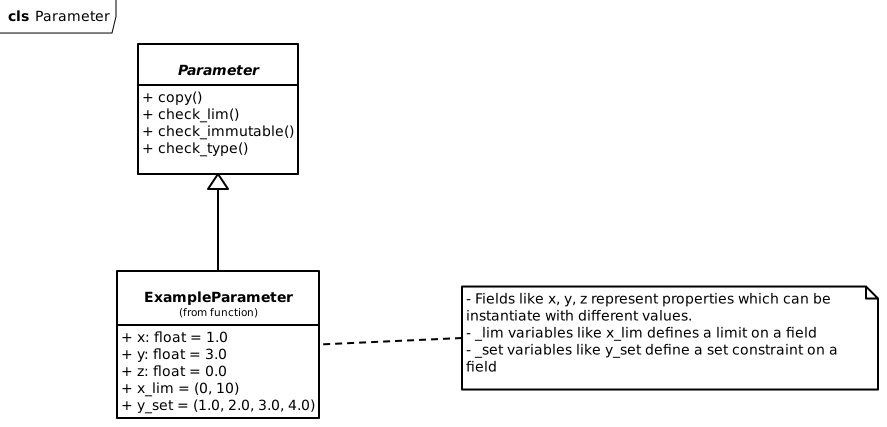
Example of extending the Parameter class to hold x/y/z fields.
The following template shows the basic syntax to use to define parameters:
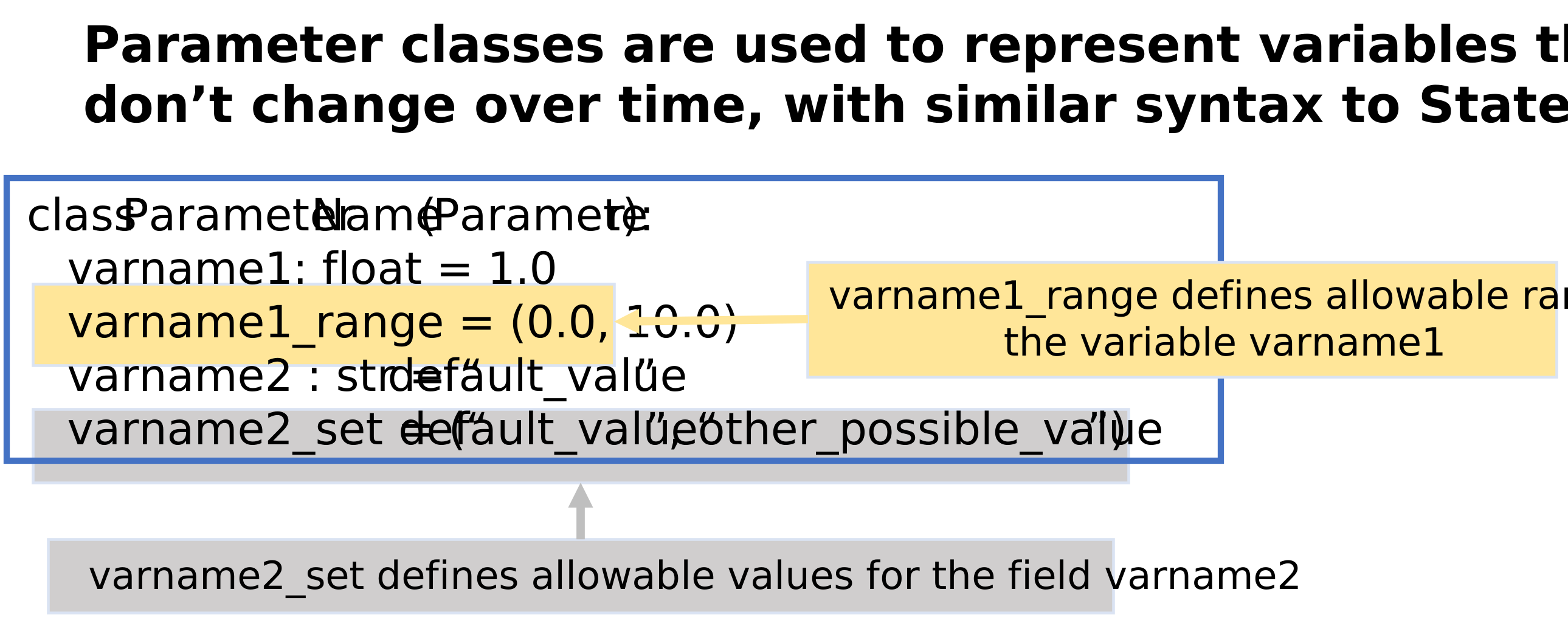
Parameter class template/example.
- class fmdtools.define.container.parameter.Parameter(*args, strict_immutability=True, check_type=True, check_pickle=True, set_type=True, check_lim=True, **kwargs)
Bases:
BaseContainerThe Parameter class defines model/function/flow values which are immutable.
That is, the same from model instantiation through a simulation. Parameters inherit from recordclass, giving them a low memory footprint, and use type hints and ranges to ensure parameter values are valid. e.g.,:
Examples
>>> class ExampleParameter(Parameter, readonly=True):
...    x: float = 1.0
...    y: float = 3.0
...    z: float = 0.0
...    x_lim = (0, 10)
...    y_set = (1.0, 2.0, 3.0, 4.0)
defines a parameter with float x and y fields with default values of 30 and x_lim minimum/maximum values for x and y_set possible values for y. Note that readonly=True should be set to ensure fields are not changed.
This parameter can then be instantiated using:
>>> p = ExampleParameter(x=1.0, y=2.0)
>>> p.x
1.0
>>> p.y
2.0
>>> p.copy()
ExampleParameter(x=1.0, y=2.0, z=0.0)
>>> p.copy(x=3.0)
ExampleParameter(x=3.0, y=2.0, z=0.0)
- base_type()
Return fmdtools type of the model class.
- check_immutable()
Check if a known/common mutable or a known/common immutable.
If known immutable, raise exception. If not known mutable, give a warning.
- Raises:
Exception – Throws exception if a known mutable (e.g., dict, set, list, etc)
- check_lim(k, v)
Check to ensure the value v for field k is within the defined limits.
Limits defined for field k defined in self.k_lim or set constraints self.k_set.
- Parameters:
k (str) – Field to check
v (mutable) – Value for the field to check
- Raises:
Exception – Notification that the field is outside limits/set constraints.
- check_type()
Check to ensure Parameter type-hints are being followed.
- Raises:
Exception – Raises exception if a field is not the same as its defined type.
- classmethod get_set_const(field)
Get limits or allowed values through nested Parameter annotations.
- reset()
Do nothing since the parameter is immutable.
- return_mutables()
Return mutable aspects of the container.
fmdtools.define.container.rand
Defines Rand class and other methods defining random properties used in blocks.
Has public Classes and Functions:
Rand: Superclass for Block random properties.get_pfunc_for_dist(): Gets the corresponding probability mass/density for outcome x for probability distributions with name ‘randname’ in numpy.get_prob_for_rand(): Gets the corresponding probability mass/density for random sample x from ‘randname’ function in numpy.calc_prob_for_integers(): Calculate probability for random.integers.calc_prob_density_for_random(): Calc probability density for random.random.calc_prob_for_choice(): Calculate probability for random.choice.calc_prob_for_shuffle_permutation(): Calculate probability for random.shuffle and random.permutation.calc_prob_for_permuted(): Calculate probability for random.permuted.:func:`array
- class fmdtools.define.container.rand.ExampleRand(*args, **kwargs)
Bases:
RandExample Rand for testing and docs.
- has_uint32: int
- inc: int
- probdens: float64
- probs: list
- rng: Generator
- run_stochastic: bool
- seed: int
- state: int
- track_pdf: bool
- uinteger: int
- class fmdtools.define.container.rand.Rand(*args, **kwargs)
Bases:
BaseContainerClass for defining and interacting with random states of the model.
- rng
random number generator
- Type:
np.random.default_rng
- probs
probability of the given states
- Type:
list
- seed
state for the random number generator
- Type:
int
- run_stochastic
Whether the rand is to be updated/called
- Type:
bool
- track_pdf
Whether a pdf is to be tracked and returned from the Rand.
- Type:
bool
Examples
Rand is meant to be extended in model definition with random states, e.g.:
>>> class RandState(State):
...     noise: np.float64=1.0
>>> class ExampleRand(Rand):
...     s: RandState = RandState()
Which enables the use of set_rand_state, update_stochastic_states, etc for updating these states with methods called from the rng when run_stochastic=True.
>>> exr = ExampleRand(run_stochastic=True, track_pdf=True)
>>> exr.set_rand_state('noise', 'normal', 1.0, 1.0)
>>> exr.s
RandState(noise=1.3047170797544314)
>>> exr.probs
[np.float64(0.3808442490605113)]
Checking copy:
>>> exr2 = exr.copy()
>>> exr2.s
RandState(noise=1.3047170797544314)
>>> exr2.run_stochastic
np.True_
>>> exr2.rng.bit_generator.state['state']['state'] == exr.rng.bit_generator.state['state']['state']
True
More state setting: >>> exr.set_rand_state(‘noise’, ‘normal’, 1.0, 1.0) >>> exr.probs [np.float64(0.3808442490605113), np.float64(0.23230084450139615)] >>> exr.return_probdens() np.float64(0.08847044068025682) >>> exr2.probs [np.float64(0.3808442490605113)]
Checking json import/export: >>> exrj = exr.tojson() >>> exr3 = ExampleRand.fromjson(exrj) >>> exr3.rng.bit_generator.state[‘state’][‘state’] == exr.rng.bit_generator.state[‘state’][‘state’] True
- asdict(*fields, exclude=['rng'], **kwargs)
Represent as a dict (exclude rng for json).
- base_type()
Return fmdtools type of the model class.
- create_repr(fields=['seed', 's'], **kwargs)
Limit default repr to relevant fields.
- create_rng()
Update the state of another rng.
- default_track = ('s', 'probdens')
- gen_state()
Generate state for rng.
- get_rand_states(auto_update_only=False)
Get the randomly-assigned states associated with the Rand at self.s.
- Parameters:
auto_update_only (bool, optional) – Whether to only get auto-updated states. The default is False.
- Returns:
rand_states – States in self.s
- Return type:
dict
Examples
>>> ExampleRand().get_rand_states()
{'noise': np.float64(1.0)}
>>> ExampleRand().get_rand_states(auto_update_only=True)
{}
- has_uint32: int
- inc: int
- init_hist_att(hist, att, timerange, track, str_size='<U20')
Add field ‘att’ to history. Accommodates track_pdf option.
- is_set()
- probdens: float64
- probs: list
- reset()
Reset Rand to the initial state.
- return_mutables()
Get mutable rand states.
- return_probdens()
Return probability density/mass corresponding to random sim.
- rng: Generator
- rolename = 'r'
- run_stochastic: bool
- seed: int
- set_field(fieldname, value, as_copy=True)
Extend BaseContainer.assign to accomodate the rng.
- set_rand_state(statename, methodname, *args)
Update the given random state with a given method and arguments.
(if in run_stochastic mode)
Array draws are accepted for list- or ndarray-valued states. Scalar states still reject array results so an incorrect draw size is not hidden.
- Parameters:
statename (str) – name of the random state defined
methodname – str name of the numpy method to call in the rng
*args (args) – arguments for the numpy method
- state: int
- store_rng_state(rng)
Update state from the rng.
- track_pdf: bool
- uinteger: int
- update_seed(seed, state=[])
Update the random seed to the given value.
- update_stochastic_states()
Update the defined stochastic states defined to auto-update.
- class fmdtools.define.container.rand.RandState(*args, check_docs=False, get_fields=True, set_type=True, **kwargs)
Bases:
StateExample random state for testing and docs.
- noise: float64
- fmdtools.define.container.rand.as_prob(pd)
Return array output of probabilities as single joint probability.
- fmdtools.define.container.rand.calc_prob_density_for_random(x)
Get the joint density of independent unit-uniform draws from rng.random.
Each draw has density one on [0, 1), so their joint density is one when every value is in that interval and zero otherwise. An empty draw has the empty-product density of one.
Examples
>>> calc_prob_density_for_random([0.5])
np.float64(1.0)
>>> calc_prob_density_for_random([0.5, 0.1, 0.9, 0.5])
np.float64(1.0)
>>> calc_prob_density_for_random([0.5, 0.1, 0.9, 0.5, 1.1])
np.float64(0.0)
- fmdtools.define.container.rand.calc_prob_for_choice(x, options=[], size=1, replace=True, p=None)
Get the ordered joint mass of choices from one-dimensional options.
Scalars and arrays are evaluated using all supplied values. Sampling size does not change their mass. Uniform and weighted sampling without replacement are supported. Repeated values can represent several distinct selectable indices; their ordered mass sums over all valid index sequences. Retain floating-point precision.
Examples
>>> calc_prob_for_choice([1], [1,2])
np.float64(0.5)
>>> calc_prob_for_choice([1,2], [1,2], replace=False)
np.float64(0.5)
>>> bool(np.isclose(calc_prob_for_choice([1,2], [1,2,3], p=[0.1, 0.1, 0.8]), 0.01))
True
- fmdtools.define.container.rand.calc_prob_for_integers(x, low, high=None, size=None, dtype=<class 'numpy.int64'>, endpoint=False)
Get the joint mass of independent np.default_rng.integers draws.
Bounds broadcast against the supplied values. Size and dtype describe generation, not the mass of those values. Empty draws have joint mass one. Accepted fractional bounds are truncated before support and width checks.
Examples
>>> calc_prob_for_integers([0], 2)
np.float64(0.5)
>>> calc_prob_for_integers([0, 1], 0, 2)
np.float64(0.25)
>>> calc_prob_for_integers([0, 1, 2], 0, 2)
np.float64(0.0)
- fmdtools.define.container.rand.calc_prob_for_permuted(x, axis=None)
Get the joint mass of independently permuted slices, including repeats.
With no axis, the entire flattened array is permuted. Otherwise each slice is shuffled independently. Repeated values contribute all indexed orders that produce the same observable result.
Examples
>>> calc_prob_for_permuted(np.array([[1,2], [3,4]]))
np.float64(0.041666666666666664)
>>> bool(np.isclose(calc_prob_for_permuted(np.array([[1,2], [3,4], [5,6]]), 0), 1/36))
True
>>> calc_prob_for_permuted(np.array([[1,2], [3,4], [5,6]]), 1)
np.float64(0.125)
- fmdtools.define.container.rand.calc_prob_for_shuffle_permutation(x, options, axis=None, *, check_valid=True)
Get the mass of a shared-axis shuffle or permutation, including repeats.
An explicit axis moves whole slices together. With no axis, preserve the helper’s flattened-array convention used by calc_prob_for_permuted. Repeated slices contribute every index ordering yielding the same output. When check_valid is False, infer the mass from options without checking x.
Examples
>>> calc_prob_for_shuffle_permutation([1,2], [1,2])
np.float64(0.5)
>>> calc_prob_for_shuffle_permutation([2,1,3], [1,2,3])
np.float64(0.16666666666666666)
>>> calc_prob_for_shuffle_permutation([1,2,1], [1,1,2])
np.float64(0.3333333333333333)
>>> calc_prob_for_shuffle_permutation([1,1,1], [1,2,3])
np.float64(0.0)
- fmdtools.define.container.rand.get_custom_pfunc(func_handle, *args, **kwargs)
Get callable for calc_func pdf/pmf function with provided arguments.
- fmdtools.define.container.rand.get_dirichlet_pdf(alpha, size=None)
Get the joint density of complete Dirichlet vectors on the last axis.
NumPy places components last; SciPy’s PDF expects them first. Leading axes represent independent draws, and size is only a generation argument.
- fmdtools.define.container.rand.get_exp_ray_pdf(randname, scale=1.0, size=None)
Get exponential or Rayleigh density with NumPy’s scale and sample size.
Both generators use a zero location. Size controls generation, not the density of the supplied samples.
Examples
>>> get_exp_ray_pdf("rayleigh", 2)(2.0)
np.float64(0.3032653298563167)
>>> get_exp_ray_pdf("rayleigh", 2, 2)(2.0)
np.float64(0.3032653298563167)
>>> get_exp_ray_pdf("exponential", 1)(0.0)
np.float64(1.0)
>>> get_exp_ray_pdf("exponential", 1, (2, 3))(0.0)
np.float64(1.0)
- fmdtools.define.container.rand.get_gamma_pdf(shape, scale=1.0, size=None)
Get the joint Gamma density using NumPy’s shape and scale parameters.
Size controls sample generation and is not a density parameter.
Examples
>>> get_gamma_pdf(1.0, 2.0)(0.0)
np.float64(0.5)
- fmdtools.define.container.rand.get_hypergeometric_pmf(ngood, nbad, nsample, size=None)
Get a hypergeometric mass from NumPy’s scalar or array-like counts.
Truncate accepted fractional counts as NumPy does, then add populations without narrow-integer overflow. The optional size controls generation and does not change the supplied mass.
Examples
>>> get_hypergeometric_pmf(50, 450, 100)(10)
np.float64(0.14736784420411747)
- fmdtools.define.container.rand.get_location_scale_pdf(randname, loc=0.0, scale=1.0, size=None)
Get a location-scale density without passing NumPy’s size to SciPy.
The sample size controls generation, not the density of supplied values. Randname is the corresponding SciPy distribution name.
Examples
>>> get_location_scale_pdf("laplace", 0.0, 2.0, (2, 3))(0.0)
np.float64(0.25)
- fmdtools.define.container.rand.get_lognormal_pdf(mean=0.0, sigma=1.0, size=None)
Get a lognormal density using NumPy’s defaults for the underlying normal.
Size controls sample generation and does not change the density.
Examples
>>> get_lognormal_pdf(0, .25)(1.0)
np.float64(1.5957691216057308)
>>> get_lognormal_pdf()(1.0)
np.float64(0.3989422804014327)
- fmdtools.define.container.rand.get_multinomial_pmf(n, pvals, size=None)
Get the joint mass of multinomial count vectors on the last axis.
Removes NumPy’s optional size controls generation since it is not a PMF parameter. Leading axes are independent draws; n and pvals retain their broadcasting.
- fmdtools.define.container.rand.get_multivariate_hypergeometric_pmf(colors, nsample, size=None, method='marginals')
Get joint finite-urn probabilities without forwarding sampling options.
Size and method select NumPy’s sample layout and generation algorithm. SciPy’s PMF uses only the population counts and number of selected items. Empty batches of complete count vectors have the empty-product mass one.
- fmdtools.define.container.rand.get_multivariate_normal_pdf(mean, cov, size=None, check_valid='warn', tol=1e-08)
Get Gaussian vector densities without forwarding generation-only options.
Size, check_valid and tol configure NumPy sampling, not the density. Positive-semidefinite covariances use SciPy’s density on their support.
- fmdtools.define.container.rand.get_pareto_pdf(a, size=None)
Get the Lomax density corresponding to NumPy’s Pareto II draws.
NumPy’s samples start at zero, unlike SciPy’s Pareto I distribution. The optional draw size does not change the density of the supplied values.
Examples
>>> get_pareto_pdf(3.0)(0.0)
np.float64(3.0)
>>> get_pareto_pdf(3.0)(1.0)
np.float64(0.1875)
- fmdtools.define.container.rand.get_permuted_pfunc(options=None, axis=None, out=None)
Get a mass function using NumPy’s input/axis/output-buffer signature.
Output buffers are used only during generation. Without options, retain the direct helper’s convention of inferring the population from supplied values. NaNs in floating or complex populations are retained values, so matching NaNs do not make a generated permutation impossible.
- fmdtools.define.container.rand.get_pfunc_for_dist(randname, *args)
Get the probability mass/density function corresponding to a numpy random draw.
Uses a call to scipy.stats when available (with the correct arguments), otherwise uses a custom function provided in this module.
Univariate discrete and shape-family sampling sizes are accepted without shifting the support or changing distribution parameters. Poisson’s omitted rate uses NumPy’s default of one. Binomial trial counts follow NumPy’s integer conversion before evaluating their probability mass.
- Parameters:
randname (str) – Name of numpy.random distribution
args (tuple) – Arguments sent to numpy.random distribution
- Returns:
pfunc – pdf/pmf for the draw.
- Return type:
callable
- fmdtools.define.container.rand.get_prob_for_rand(x, randname, *args)
Get the probability density/mass for random sample x.
Pulled from ‘randname’ function in numpy. Calls get_pfunc_for_dist when scipy has a corresponding distribution function, otherwise calls custom functions to calculate the probabilities/probability densities.
- Parameters:
x (int/float/array) – samples to get probability mass/density of
randname (str) – Name of numpy.random distribution
*args (tuple) – Arguments sent to numpy.random distribution
- Returns:
prob
- Return type:
float of probability density or mass, depending on function
Examples
>>> get_prob_for_rand(0, "normal", 0, 1)
np.float64(0.3989422804014327)
>>> get_prob_for_rand([0,0], "normal", 0, 1)
np.float64(0.15915494309189535)
>>> get_prob_for_rand(2, "integers", 4)
np.float64(0.25)
>>> bool(np.isclose(get_prob_for_rand([0, 0], "binomial", 1, 0.5, 2), 0.25))
True
- fmdtools.define.container.rand.get_scipy_pdf(randname, *args, **kwargs)
Get callable for scipy pdf function with given name and arguments.
- fmdtools.define.container.rand.get_scipy_pmf(randname, *args, **kwargs)
Get callable for scipy pmf function with given name and arguments.
- fmdtools.define.container.rand.get_shuffle_permutation_pfunc(options, axis=0)
Get shuffle/permutation mass using NumPy’s default shared axis.
- fmdtools.define.container.rand.get_standard_cauchy_pdf(size=None)
Get standard Cauchy density without using sample size as location.
- fmdtools.define.container.rand.get_standard_gamma_pdf(shape, size=None, dtype=<class 'numpy.float64'>, out=None)
Get the joint density of NumPy standard Gamma draws (unit scale).
Size, dtype, and out control generation, not the density of supplied values.
Examples
>>> get_standard_gamma_pdf(1.0, 3)([0.0, 0.0, 0.0])
np.float64(1.0)
- fmdtools.define.container.rand.get_standard_normal_pdf(size=None, dtype=<class 'numpy.float64'>, out=None)
Get standard normal density, accepting generation-only size/dtype/out.
The density has zero location and unit scale for every requested draw shape. The output buffer is not modified when evaluating the density.
- fmdtools.define.container.rand.get_standard_t_pdf(df, size=None)
Get the joint density of independent numpy.random.standard_t draws.
Use univariate Student t factors, including broadcast degrees of freedom. The optional draw size does not change the density of the supplied values.
Examples
>>> get_standard_t_pdf(1)([0.0])
np.float64(0.31830988618379075)
- fmdtools.define.container.rand.get_triangular_pdf(left, mode, right, size=None)
Get a triangular density from scalar or broadcastable array-like bounds.
Convert parameters to floating point before subtraction, as NumPy’s generator does. The optional size controls generation and is not a density parameter.
Examples
>>> get_triangular_pdf(0,1,2)(0.0)
np.float64(0.0)
>>> get_triangular_pdf(0,1,2)(1.0)
np.float64(1.0)
>>> get_triangular_pdf(0,1,2)(1.5)
np.float64(0.5)
>>> get_triangular_pdf(0,1,2)(0.5, 0.5)
np.float64(0.25)
- fmdtools.define.container.rand.get_uniform_pdf(low=0.0, high=1.0, size=None)
Get a uniform density using NumPy’s lower and upper bounds.
NumPy specifies endpoints; SciPy specifies location and interval width. Promote bounds before subtraction so fixed-width inputs cannot overflow. The optional draw size does not change the density of the supplied values.
Examples
>>> get_uniform_pdf(5.0, 6.0)(5.5)
np.float64(1.0)
>>> get_uniform_pdf(5.0, 6.0)(7.0)
np.float64(0.0)
- fmdtools.define.container.rand.get_vonmises_pdf(mu, kappa, size=None)
Get a von Mises density using NumPy’s mean and concentration arguments.
SciPy uses kappa as a shape parameter and mu as its circular location. The optional draw size does not change the density of the supplied values.
Examples
>>> bool(np.isclose(get_vonmises_pdf(0.0, 0.0)(0.0), 1 / (2 * np.pi)))
True
- fmdtools.define.container.rand.get_wald_pdf(mean, scale, size=None)
Get the inverse Gaussian density using NumPy’s Wald parameters.
SciPy’s inverse Gaussian uses mean/scale as its shape and scale as its scale parameter, with zero location. Size only controls sample generation.
Examples
>>> bool(np.isclose(get_wald_pdf(2.0, 3.0)(2.0), np.sqrt(3 / (16 * np.pi))))
True
- fmdtools.define.container.rand.matching_indices(draw, options, has_nan)
Determine if choice indices match.
fmdtools.define.container.time
Defines Time class for containing timers and time-related constructs.
- class fmdtools.define.container.time.ExtendedTime(*args, **kwargs)
Bases:
TimeExample extended time class for testing, etc.
- dt: float64
- executed_dynamic: bool
- executed_static: bool
- executing: bool
- force_locals: bool
- global_dt: float64
- t_ind: int32
- time: float64
- timernames = ('t1', 't2')
- timers: dict
- use_global: bool
- class fmdtools.define.container.time.Time(*args, **kwargs)
Bases:
BaseContainerClass for defining time/execution aspects of a Block (e.g., time, timestep, timers).
- time
real time for the model
- Type:
float
- dt
Timestep for simulation execution.
- Type:
float
- t_ind
index of the given time in the history.
- Type:
int
- executed_static
Whether a sim’s static behavior has executed yet this timestep (or not).
- Type:
bool
- executed_dynamic
Whether a sim’s dynamic behavior has executed yet this timestep (or not).
- Type:
bool
- executing
Whether the timestep of the sim is executing or has finished executing. Gets set as true when time is updated and false when the timestep is incremented
- Type:
bool
- timers
dictionary of instantiated timers
- Type:
dict
- global_dt
The timestep of the containing object.
- Type:
float
- force_locals
Whether to force contained objects to use this timestep. Default is True.
- Type:
bool
- use_global
Whether the local timetep should be overrriden by the global timestep
- Type:
bool
- timernames
Names of timers to instantiate.
- Type:
tuple
Examples
Extending the time class gives one access to a dict of timers:
>>> class ExtendedTime(Time):
...     timernames = ('t1', 't2')
>>> t = ExtendedTime()
>>> t.timers['t1']
Timer t1: mode= standby, time= 0.0
These timers can then be used:
>>> t.timers['t1'].inc(1.0)
>>> t.timers['t1']
Timer t1: mode= ticking, time= 1.0
Checking copy:
>>> t2 = t.copy()
>>> t2.timers
{'t1': Timer t1: mode= ticking, time= 1.0, 't2': Timer t2: mode= standby, time= 0.0}
Check that copied timers are independent:
>>> t2.timers['t1'].__hash__() == t.timers['t1'].__hash__()
False
Check json: >>> js = t.tojson() >>> t3 = ExtendedTime.fromjson(js) >>> t3.timers {‘t1’: Timer t1: mode= ticking, time= 1.0, ‘t2’: Timer t2: mode= standby, time= 0.0}
- base_type()
Return fmdtools type of the model class.
- create_repr(fields=['time', 'timers'], **kwargs)
Limit model repr to relevant time/timers fields.
- default_track = 'timers'
- dt: float64
- executed_dynamic: bool
- executed_static: bool
- executing: bool
- force_locals: bool
- get_sim_times(time)
Get the start and end time for the end of the timestep (if not provided).
If the current time is -0.1, sets start_time at 0.0 for static propagation. Otherwise gets the time at the next timestep.
- Returns:
start_time (float) – Starting time for the timestep
end_time (float) – Ending time for the timestep.
- get_sub_kwargs()
Get keyword arguments to send to contained objects.
- global_dt: float64
- has_executed()
Return whether the Simulabe has been called.
- init_hist_att(hist, att, timerange, track, str_size='<U20')
Add field ‘att’ to history. Accommodates time and timer tracking.
- reset()
Reset time and all execution flags while preserving timestep settings.
- return_mutables()
Return mutable aspects of the container.
- rolename = 't'
- set_timestep(**kwargs)
Set the timestep of the function given.
- The default timestep follows the following order of precedence:
local dt argument (e.g., set in default_t)
global dt argument (e.g., from a containing Architecture)
If use_global = True (set in default_t), the global dt argument takes precedence over the local timestep.
If force_locals = True, the dt of the current object takes precedence over the objects it contains.
- t_ind: int32
- time: float64
- timernames = ()
- timers: dict
- update_time(time)
Update the current time from the overall simulation.
- use_global: bool