

Exploring nitrogen dioxide (NO2) data from PACE/OCI#

Author(s): Anna Windle (NASA, SSAI), Zachary Fasnacht (NASA, SSAI)

Last updated: March 5, 2026

Summary#

This tutorial describes how to access and download trace gas data products developed from PACE OCI data. More information on how these products were created can be found in Fasnacht et al. (2025). This notebook includes examples on how to plot L3M NO2 data as a static and interactive map, as well as how to plot an interactive time series plot. It also provides examples on how to open and plot L2 NO2 data.

Learning Objectives#

At the end of this notebook you will know:

  • How to access PACE OCI trace gas data products

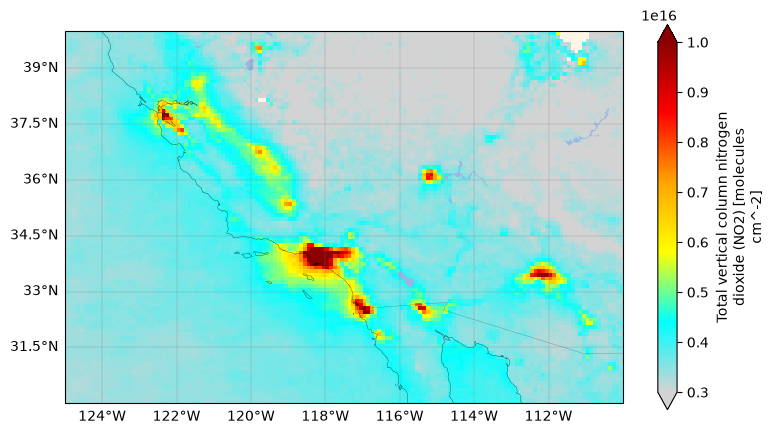
  • Where to find high NO2 vertical column retrievals (hint: it’s a big city)

  • How to create a time series of NO2 data collected at a single location

  • Open and plot L2 NO2 data

1. Setup#

Begin by importing all of the packages used in this notebook and setting your Earthdata Login credentials.

from datetime import datetime

import cartopy
import cartopy.crs as ccrs
import cartopy.feature as cfeature
import earthaccess
import holoviews
import hvplot.xarray
import matplotlib.colors
import matplotlib.pyplot as plt
import pandas as pd
import xarray as xr

holoviews.config.image_rtol = 1e-2
auth = earthaccess.login()

2. Search for L3M PACE Trace Gas Data#

Level-2 (L2) and Level-3 mapped (L3M) trace gas (TRGAS) data products are available on NASA Earthdata.

Let’s search and open up the first L3M file collected during the temporal span of January 2025 to December 2025:

tspan = ("2025-01-01", "2025-12-31")

results = earthaccess.search_data(
    short_name="PACE_OCI_L3M_TRGAS",
    temporal=tspan,
    count=1,
)
paths = earthaccess.open(results)
paths
[<File-like object S3FileSystem, ob-cumulus-prod-public/PACE_OCI.20250101_20250131.L3m.MO.TRGAS.V3_0.0p1deg.nc>]

You can see that this search opened PACE_OCI.20250101_20250131.L3m.MO.TRGAS.V3_0.0p1deg.nc which is a L3M monthly (MO) composite with a 0.1° (0p1deg) pixel resolution.”

3. Open as an XArray dataset#

We will use xarray.open_dataset to open the NetCDF and then merge them into a single dataset.

dataset = xr.open_dataset(paths[0])
dataset
<xarray.Dataset> Size: 52MB
Dimensions:           (lat: 1800, lon: 3600)
Coordinates:
  * lat               (lat) float32 7kB 89.95 89.85 89.75 ... -89.85 -89.95
  * lon               (lon) float32 14kB -179.9 -179.9 -179.8 ... 179.9 180.0
Data variables:
    total_column_o3   (lat, lon) float32 26MB ...
    total_column_no2  (lat, lon) float32 26MB ...
Attributes: (12/54)
    product_name:                      PACE_OCI.20250101_20250131.L3m.MO.TRGA...
    instrument:                        OCI
    title:                             OCI Level-3 Standard Mapped Image
    project:                           Ocean Biology Processing Group (NASA/G...
    platform:                          PACE
    source:                            satellite observations from OCI-PACE
    ...                                ...
    keywords:                          
    id:                                L3/PACE_OCI.20250101_20250131.L3m.MO.T...
    history:                           l3mapmerge.py -v l3mapmerge_inputs.txt...
    processing_version:                3.0
    identifier_product_doi_authority:  https://dx.doi.org
    identifier_product_doi:            10.5067/PACE/OCI/L3M/TRGAS/3.0

If you expand the total_column_no2 variable, you’ll see that it is a 2D variable consisting of total vertical column NO2 measurements with units of molecules cm-2. Let’s plot it!

fig, ax = plt.subplots(figsize=(9, 5), subplot_kw={"projection": ccrs.PlateCarree()})
ax.coastlines(linewidth=0.2)
ax.add_feature(cfeature.BORDERS, linewidth=0.1)
ax.add_feature(cfeature.OCEAN, linewidth=0.2)
ax.add_feature(cfeature.LAKES, linewidth=0.2)
ax.add_feature(cfeature.LAND, facecolor="oldlace", linewidth=0.2)
cmap = matplotlib.colors.LinearSegmentedColormap.from_list(
    name="no2",
    colors=["lightgrey", "cyan", "yellow", "orange", "red", "darkred"],
)
dataset["total_column_no2"].plot(x="lon", y="lat", vmin=3e15, vmax=10e15, cmap=cmap)
ax.gridlines(
    draw_labels={"left": "y", "bottom": "x"},
    linewidth=0.25,
    color="grey",
    alpha=0.8,
)
plt.show()
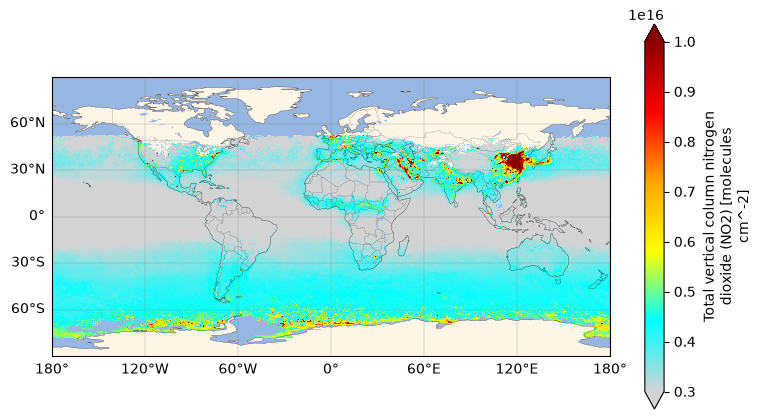
../../_images/e0bd069f91c4478d02c37cc1f3cf241fe662673d410dd0adccf2e2e248bb629c.png

Let’s zoom in to Los Angeles, California.

plt.sca(ax)
plt.xlim(-125, -110)
plt.ylim(30, 40)
plt.show()
../../_images/39c2aa81b3553b91147cf1c9295324127523ab29d8e1d46e3db95de1b05e13de.png

4. Interactive NO2 plot#

An interative plot allows you to engage with the data such as zooming, panning, and hovering over for more information. We will use the hvplot accessor on XArray data structures to make an interactive plot of the single file we accessed above.

dataset["total_column_no2"].hvplot(
    x="lon",
    y="lat",
    cmap=cmap,
    clim=(3e15, 10e15),
    aspect=2,
    title="Total vertical column NO₂ April 2024",
    widget_location="top",
    geo=True,
    coastline=True,
    tiles="EsriWorldStreetMap",
)

5. Time Series#

Since there are many L3M NO2 granules available, we can make a time series of NO2 concentrations over time. Let’s search for L3M trace gas data as monthly composites at 4km spatial resolution from January-December 2025:

results = earthaccess.search_data(
    short_name="PACE_OCI_L3M_TRGAS",
    granule_name="*.MO.*.4km.*",
    temporal=tspan,
)
paths = earthaccess.open(results)

You can see that 12 L3M files were found, one for each month. Now we will combine the files into one xarray dataset. This can take several minutes.

dataset = xr.open_mfdataset(
    paths,
    concat_dim="date",
    combine="nested",
)
dataset
<xarray.Dataset> Size: 4GB
Dimensions:           (date: 12, lat: 4320, lon: 8640)
Coordinates:
  * lat               (lat) float32 17kB 89.98 89.94 89.9 ... -89.94 -89.98
  * lon               (lon) float32 35kB -180.0 -179.9 -179.9 ... 179.9 180.0
Dimensions without coordinates: date
Data variables:
    total_column_o3   (date, lat, lon) float32 2GB dask.array<chunksize=(1, 512, 1024), meta=np.ndarray>
    total_column_no2  (date, lat, lon) float32 2GB dask.array<chunksize=(1, 512, 1024), meta=np.ndarray>
Attributes: (12/54)
    product_name:                      PACE_OCI.20250101_20250131.L3m.MO.TRGA...
    instrument:                        OCI
    title:                             OCI Level-3 Standard Mapped Image
    project:                           Ocean Biology Processing Group (NASA/G...
    platform:                          PACE
    source:                            satellite observations from OCI-PACE
    ...                                ...
    keywords:                          
    id:                                L3/PACE_OCI.20250101_20250131.L3m.MO.T...
    history:                           l3mapmerge.py -v l3mapmerge_inputs.txt...
    processing_version:                3.0
    identifier_product_doi_authority:  https://dx.doi.org
    identifier_product_doi:            10.5067/PACE/OCI/L3M/TRGAS/3.0

Let’s replace the date coordiante with date information from dataset attributes.

dates = [xr.open_dataset(i).attrs["time_coverage_end"] for i in paths]
dt = pd.to_datetime(dates)
dataset = dataset.assign_coords(date=dt.values)
dataset
<xarray.Dataset> Size: 4GB
Dimensions:           (date: 12, lat: 4320, lon: 8640)
Coordinates:
  * date              (date) datetime64[ns] 96B 2025-02-01T02:00:37.923000 .....
  * lat               (lat) float32 17kB 89.98 89.94 89.9 ... -89.94 -89.98
  * lon               (lon) float32 35kB -180.0 -179.9 -179.9 ... 179.9 180.0
Data variables:
    total_column_o3   (date, lat, lon) float32 2GB dask.array<chunksize=(1, 512, 1024), meta=np.ndarray>
    total_column_no2  (date, lat, lon) float32 2GB dask.array<chunksize=(1, 512, 1024), meta=np.ndarray>
Attributes: (12/54)
    product_name:                      PACE_OCI.20250101_20250131.L3m.MO.TRGA...
    instrument:                        OCI
    title:                             OCI Level-3 Standard Mapped Image
    project:                           Ocean Biology Processing Group (NASA/G...
    platform:                          PACE
    source:                            satellite observations from OCI-PACE
    ...                                ...
    keywords:                          
    id:                                L3/PACE_OCI.20250101_20250131.L3m.MO.T...
    history:                           l3mapmerge.py -v l3mapmerge_inputs.txt...
    processing_version:                3.0
    identifier_product_doi_authority:  https://dx.doi.org
    identifier_product_doi:            10.5067/PACE/OCI/L3M/TRGAS/3.0

Let’s select the nearest pixel to 34°N, 118°W (Los Angeles).

array = dataset["total_column_no2"].sel({"lat": 34, "lon": -118}, method="nearest")
array
<xarray.DataArray 'total_column_no2' (date: 12)> Size: 48B
dask.array<getitem, shape=(12,), dtype=float32, chunksize=(1,), chunktype=numpy.ndarray>
Coordinates:
  * date     (date) datetime64[ns] 96B 2025-02-01T02:00:37.923000 ... 2026-01...
    lat      float32 4B 34.02
    lon      float32 4B -118.0
Attributes:
    long_name:      Total vertical column nitrogen dioxide (NO2)
    units:          molecules cm^-2
    standard_name:  atmosphere_mole_content_of_nitrogen_dioxide
    valid_min:      0.0
    valid_max:      1e+17
    display_scale:  linear
    display_min:    3e+15
    display_max:    8e+15

You can see how this selection creates a new 1D dataset with values for one pixel across time. Let’s plot it using hvplot.

(array.hvplot.line(x="date", line_width=2)
    * array.hvplot.scatter(x="date", size=60, color="crimson")
).opts(
    title="Time series of total vertical column NO₂ at (34°N, -118°W)",
    width=800,
    height=400,
    ylabel="NO₂ (molecules cm⁻²)",
    show_grid=True,
)

6. Search and open L2 trace gas data#

PACE OCI trace gas data are also available as L2 granules. Let’s search, open, and plot L2 TRGAS data of the LA region for two weeks in July 2025.

tspan = ("2025-07-01", "2025-07-14")
coord = (-118, 34)

results = earthaccess.search_data(
    short_name="PACE_OCI_L2_TRGAS",
    temporal=tspan,
    point=coord,
)

paths = earthaccess.open(results)

Notice there are more than 14 results, because even a single coordinate can be viewed twice in one day by OCI when its at the edge of the swath. It requires some fine-tuning to get a grid of daily plots that shows the better (i.e. closer to nadir) scenes, which we choose by thresholding the distance (5.5°) to the minimum and maximum longitudes for each scene.

rows = 2
cols = 7
crs = ccrs.PlateCarree()
extent = [-119.0, -117.5, 33.5, 34.5]

fig = plt.figure(figsize=(20, 4))

i = 0
for item in paths:
    ds = xr.open_datatree(item)
    ds = xr.merge(ds.to_dict().values())
    ds = ds.set_coords(("longitude", "latitude"))
    
    lon_min = ds["longitude"].min().item()
    lon_max = ds["longitude"].max().item()
    if coord[0] - lon_min < 5.5:
        continue
    if lon_max - coord[0] < 5.5:
        continue

    var = ds["total_column_no2"]
    start_date = ds.attrs.get("time_coverage_start")
    start_date = datetime.fromisoformat(start_date.replace("Z", ""))

    ax = plt.subplot(rows, cols, i + 1, projection=crs)
    im = var.plot(
        x="longitude",
        y="latitude",
        vmin=3e15,
        vmax=10e15,
        cmap=cmap,
        add_colorbar=False,
    )
    ax.set_title(start_date.strftime("%Y-%m-%d %H:%M:%S"))
    ax.set_extent(extent)
    ax.coastlines(resolution="10m")
    ax.add_feature(cfeature.BORDERS, linestyle=":")
    ax.gridlines(
        draw_labels={
            "left": i % cols == 0,
            "bottom": i // cols == rows - 1,
        },
        linewidth=0.5,
        color="gray",
        alpha=0.5,
        linestyle="--",
    )
    i = i + 1

fig.colorbar(
    im,
    ax=fig.axes, # make colorbar span axes
    orientation="vertical",
    fraction=0.02,
    pad=0.02,
    label="total vertical column NO₂ (molecules cm⁻²)",
)

plt.show()
../../_images/ce1eae98dc0c72cddd61c64f18c3499b7592bf99f5ac3599f465e0c061bb49f3.png