Cumulus Backup and Restore
Deployment Backup and Restore
Most of your Cumulus deployment can be recovered by redeploying via Terraform. The Cumulus metadata stored in your RDS database, including providers, collections, granules, rules, and executions, can only be restored if backup was properly configured or enabled. If a deployment is lost, logs and Step Function executions in the AWS console will be irrecoverable.
Postgres Database
Cumulus supports a "bring your own" Postgres instance approach; however, our reference implementation utilizes a serverless Aurora RDS database - as such this reference provides AWS RDS Aurora Serverless backup options.
Backup and Restore
Backup and Restore with AWS RDS
Configuring Database Backups
For AWS RDS Aurora database deployments, AWS provides a host of database backup/integrity options, including PITR (Point In Time Recovery) based on automated database backups and replay of transaction logs.
For further information on RDS backup procedures, see the AWS documentation
Disaster Recovery
To recover a Cumulus Postgres database in a disaster or data-loss scenario, you should perform the following steps:
- If the Postgres database cluster exists/is still online, halt workflow activity, then take the cluster offline/remove access.
- Redeploy a new database cluster from your backup. See AWS's PIT recovery instructions and DB Snapshot recovery instructions, or the examples below for more information.
- Configure your Cumulus deployment to utilize the new database cluster and re-deploy.
cumulus-rds-tf examples
The following sections provide a walk through of a few recovery scenarios for the provided cumulus-rds-tf
serverless module.
Point In Time Recovery
If you need recovery that exceeds the 1-day granularity of AWS's snapshots, you either must create and manually manage snapshots, or use Point In Time Recovery (PITR) if you still have the original cluster available.
Unfortunately as terraform does not yet support RDS PITR (see: github terraform-provider issue #5286), this requires a manual procedure.
If you are using the cumulus-rds-tf module to deploy an RDS Aurora Serverless
Postgres cluster, the following procedure can be used to successfully spin up a duplicate
cluster from backup in recovery scenarios where the database cluster is still viable:
1. Halt all ingest and remove access to the database to prevent Core processes from writing to the old cluster.
Halt Ingest
Deactivate all Cumulus Rules, halt all clients that access the archive API and stop any other database accessor processes. Ensure all active executions have completed before proceeding.
Remove Database Cluster Access
Depending on your database cluster configuration, there are several ways to limit access to the database. One example:
Log in as the administrative user to your database cluster and run:
alter database my_database connection limit 0;
select pg_terminate_backend(pg_stat_activity.pid) from pg_stat_activity where pg_stat_activity.datname = 'database';
This should block new connections to the Core database from the database user and cause database writes to fail.
Note that it is possible in the above scenario to remove access to your datastore for your administrative user. Use care.
2. Using the AWS CLI (see AWS PITR documentation for console instructions), making certain to use the same subnet groups and vpc-security-group IDs from your Core deployment, run the following command:
aws rds restore-db-cluster-to-point-in-time --source-db-cluster-identifier "<cluster-needing-restoration>" --restore-to-time "<time>" --vpc-security-group-ids "<security-group-1>" "<security-group-2>" --copy-tags-to-snapshot --db-cluster-identifier "<new-cluster-identifier>" --db-subnet-group-name "<db-subnet-group>"
- cluster-needing-restoration -- the name of the database cluster you're
restoring from (
DBClusterIdentifierfrom the AWS RDS CLI output) - time - The time in UTC format (e.g. 2015-03-07T23:45:00Z)
- security-group-# - the security group IDs from your original deployment
- new-cluster-identifier - The cluster name for the backup replica. This must be different than the original
- db-subnet-group - The db subnet group created for the original cluster
(
DBSubnetGroupfrom the AWS RDS CLI output)
You can get the configuration values from the RDS console or by running the following command and parsing the outputs:
aws rds describe-db-clusters
Once the restore command is run, you should see the cluster appear in the RDS cluster
list with a Creating status. Verify the creating cluster has a configuration similar to the cluster it is replacing. Once the cluster is online, manually validate
that it has the tables/data you expect, then proceed.
3. Import cluster into terraform state
Run the following commands to bring the new cluster into the terraform state file, where {module_name} is the title you've assigned to the module:
- Remove the old cluster from your terraform state:
terraform state rm module.{module_name}.aws_rds_cluster.cumulus
- Add the restored cluster to your terraform state:
terraform import module.{module_name}.aws_rds_cluster.cumulus <new cluster identifier>
4. Update module terraform.tfvars or your rds cluster module such that the cluster_identifier variable matches the new database cluster
5. Run a terraform plan. Be very careful to ensure that the module.rds_cluster.aws_rds_cluster.cumulus resource is not being recreated as this will wipe the postgres database. You should expect to see the cluster be modified, not replaced, and the rds_login secret version will be replaced, as the host name will change
You should not need to reconfigure either, as the secret ARN and the security group should not change, however double-check the configured values are as expected.
You should expect to see output that looks like the following (with sensitive identifiers removed):
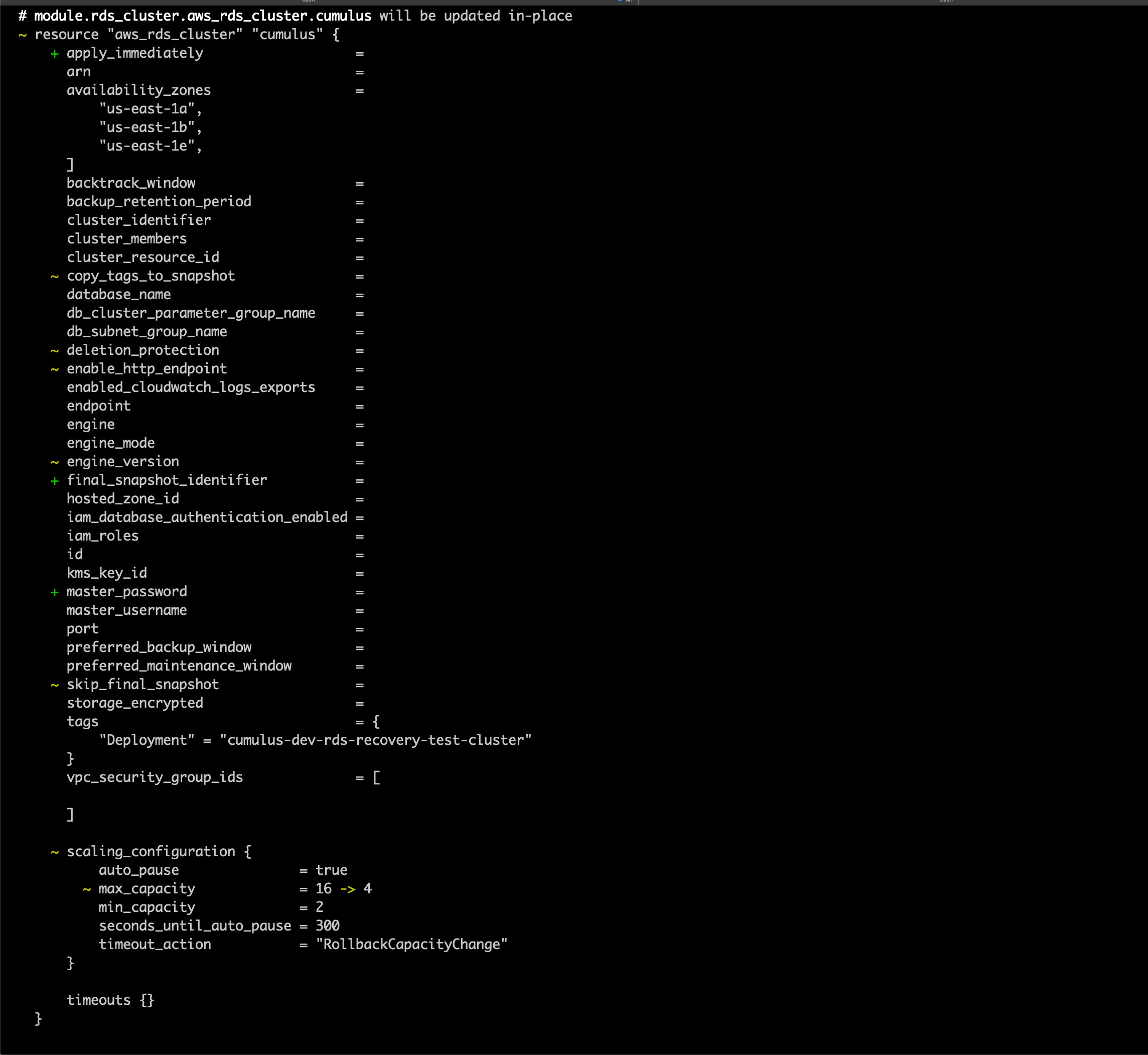
and

Once everything looks acceptable, run:
terraform apply
Snapshot Recovery
A RDS cluster can be recreated from a manually created snapshot
or one of your automated backups. These backups do not require a live cluster,
and can be used for recovery in case of accidental deletion or full cluster/backup failure. The
rds-cluster-tf terraform module supports the variable snapshot_identifier - this
variable, when set, will on cluster creation utilize an existing snapshot to
create a new cluster.
To restore a snapshot as a new cluster:
-
Halt all ingest and remove access to the database to prevent Core processes from writing to the old cluster.
-
Set the
snapshot_identifiervariable to the snapshot you wish to create, and configure the module like a new deployment, with a uniquecluster_identifier -
Deploy the module using
terraform apply -
Once deployed, verify the cluster has the expected data
-
Redeploy the data persistence and Cumulus deployments - You should not need to reconfigure either, as the secret ARN and the security group should not change, however double-check the configured values are as expected