Iceberg Design
Rationale
There are many queries on the Cumulus dashboard that would timeout for Cumulus environments with a database that had hundreds of millions to over a billion rows in the granules and executions tables in Postgres. The types of queries including counts and aggregations that were timing out are not well suited for Postgres, and with consolidating multiple Cumulus instances the size of the tables will only continue to grow. After benchmarking and performing an evaluation we found Iceberg database tables using AWS Glue catalogs and tables backed by AWS S3 files to be the best solution for powering the dashboard while handling the expected growth in inventory.
Architecture
In order to fully support the queries for the Cumulus dashboards we have the following components:
- Iceberg Database
- Iceberg API
- Replication
Iceberg Database
Iceberg tables require a metadata catalog which contains references to the files that contain the data. We use AWS Glue for the catalog and database tables. The data files are all stored in S3. The Iceberg tables are using the Iceberg V2 format. The database tables store all of the same columns as the Postgres database with the exception of the executions table which does not include the original_payload and final_payload fields in order to drastically reduce the size of the table and those columns are not needed for any of the queries supported on the Iceberg API.
Iceberg API
There is a separate Cumulus Iceberg API running in AWS ECS which handles executing queries against the Iceberg database and returning results. The Cumulus Iceberg API is an implementation of a subset of the Cumulus API which still exists queries against Postgres. The API only supports reading from Iceberg tables, no writing is performed. It makes use of DuckDB for querying the tables and has several optimizations performed at startup time to cache metadata files from S3 and utilize multiple threads to improve query performance.
Replication
The replication architecture is shown in the following diagram.
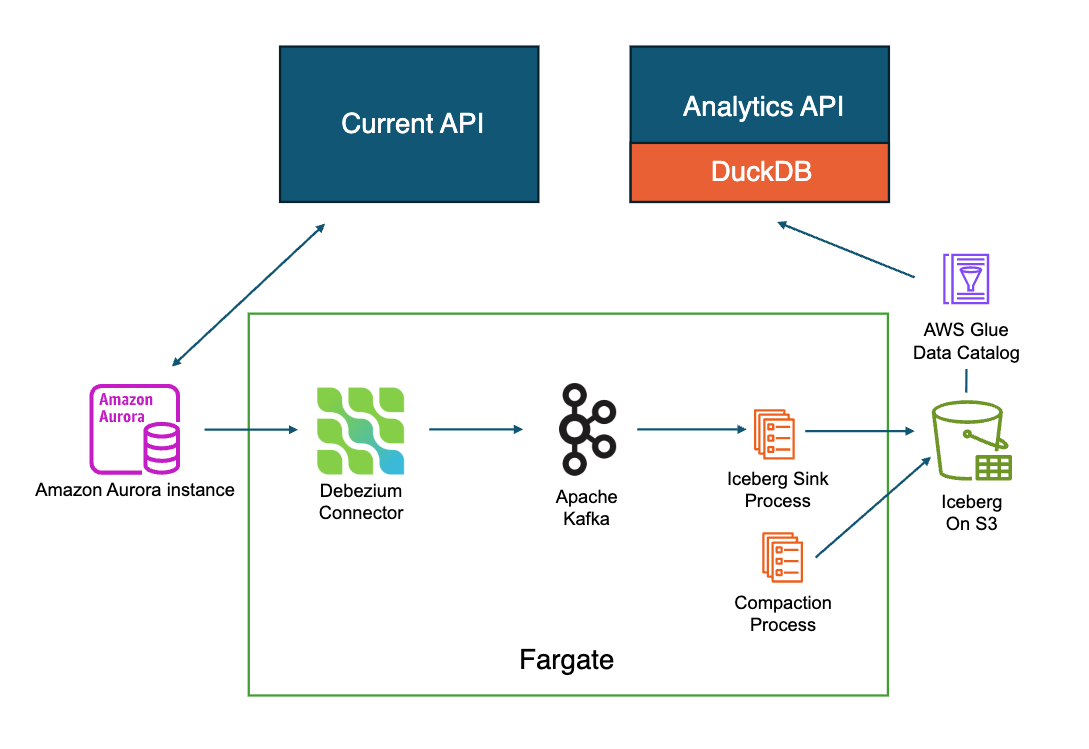
All Cumulus ingest workflows continue to exclusively write to Postgres. As inserts, updates, and deletes occur in Postgres they need to be replicated to the Iceberg database tables. Replication is handled using Fargate tasks in AWS ECS. On Postgres we have replication enabled so we can use change data capture (CDC) to receive all of the events which are stored using Kafka running in Fargate task. On another container in the Fargate task we process the events in Kafka and write the updates to the Iceberg database tables on a staging branch. While on the staging branch the updates are not yet available for querying through the API. After writing the updates to the staging branch we then compact the tables in order to remove equality deletes which cause poor performance at query time and are not well supported by DuckDB and also ensure we have larger files in S3 which also improves query performance. Once compaction is complete on the staging branch we update the main branch to point to the latest changes. For large tables (granule, files, and executions) partitioning is used in Iceberg by bucketing based on cumulus_id. This assumes cumulus_id is a sequence that increments by a small number such that recent ingests will have cumulus_id ranges near one another so that when compaction runs it should ideally only hit one or potentially and handful of partitions in order to compact much faster. When hitting only a single partition updates to Postgres tables should be visible to queries in Iceberg in under two minutes.
There are four separate ECS Fargate tasks that run replication to replicate the tables.
- executions
- granules
- files (Postgres) to files_table (Iceberg) - note the name in Iceberg is different due to clashes with a reserved files concept in Iceberg.
- all other tables
Replication Components
The replication components are all deployed to containers running in the same ECS Fargate task. The task is configured to run forever performing the replication in near real time. All of the scripts used for performing the replication are contained in the packages/iceberg-replication/ directory.
Kafka container
Runs Kafka in a container saving the Kafka queue on disk to an EFS volume so that no messages are lost on a restart of a task or a new deployment. In the future it might be worth considering the use of Amazon Managed Streaming for Apache Kafka (MSK) as an alternative to a self-managed Kafka container.
Kafka connect container
Runs the kafka-connect application which performs the Postgres CDC and submits the updates to the Kafka container running in the task.
Bootstrap container
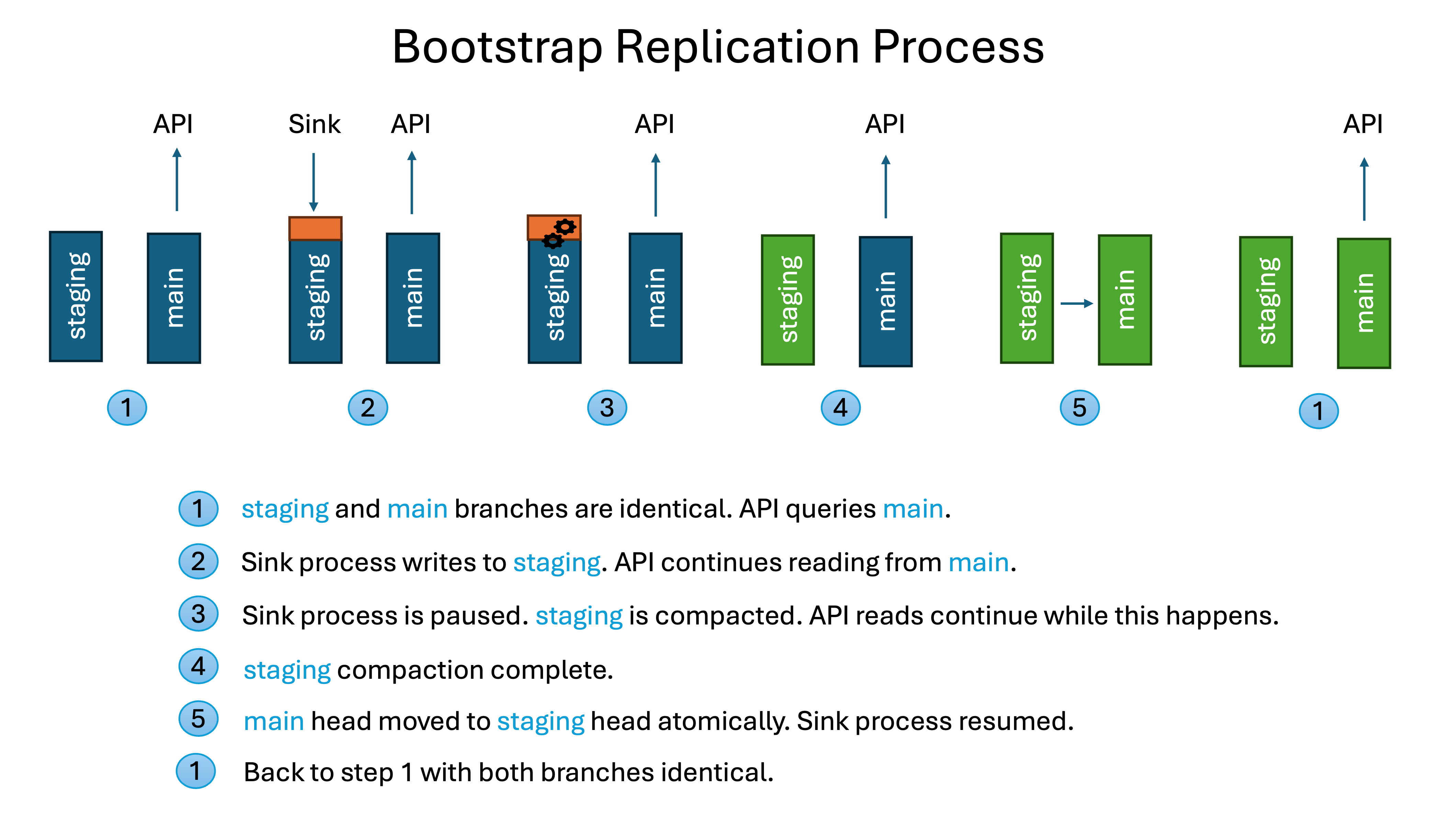
Runs the custom components which handle the replication and writing to Iceberg. The bootstrap.sh script is used to orchestrate all of the Iceberg database table setup, loading, and replication. It is invoked from within the bootstrap container in the Iceberg replication ECS Fargate task and is configured to run at all times. If the table(s) that the task is replicating do not exist on startup it will perform all of the necessary work to create the Iceberg tables based on the Postgres schema, perform the initial load from Postgres, set up the main and staging branches, and then when fully loaded run the replication in the background. The replication is performed by first finding any updates waiting in Kafka and writing those to the staging branch. Then compaction is run on any partitions affected by those writes on the staging branch, and then the main branch snapshot is updated to that latest staging branch snapshot.
This process is shown in the following diagram.
Maintenance tasks
Since replication is running in near realtime many snapshots are created which adds overhead to the metadata files tracking Iceberg tables. These older snapshots are cleaned up by a Python script included in the bootstrap Docker image. There is a scheduled job in EventBridge that triggers cleanup regularly to keep the number of snapshots low.
Orphan file deletion is configured on the Iceberg tables to automatically clean up any files in S3 that are not referenced (due to failures or partial writes) by the database tables.
Troubleshooting
Decisions and Alternatives
We've documented some of the design decisions and alternatives. It is important to revisit these decisions periodically because Iceberg is under active development and new features and updates to libraries may invalidate some of these decisions and allow for significant improvements in the future.
Iceberg format
For the Iceberg format we are using version 2. There are currently 3 version formats in the Iceberg spec and the reason we chose to use version 2 is a combination of library support as well as read and write performance. When using version 1 deletions use position deletes which require reading data as part of writing out the delete operation to a file. We found that write performance was much to slow to be able to support tens of operations per second. With version 2 we are able to use equality deletes which supports handling that type of write load we will need for ongoing replication in production environments.
DuckDB as query engine
There are several reasons we chose DuckDB as the query engine:
- Supports Iceberg catalogs and tables
- Allows querying both Postgres and Iceberg tables in the same session
- Same SQL syntax for querying Iceberg tables as Postgres tables (allowing reuse of knex query builder code)
- Has a CLI, a python library, and a NodeJS library
While developing we encountered many limitations with incomplete support for many of the things we were trying to do but were able to make it work at least as the query engine. For writing to Iceberg tables, creating database tables, and setting up table properties and partitioning we used a combination of native Java Iceberg libraries and PyIceberg due to these limitations.
DuckDB is not used as a database server like Postgres, and there is a performance penalty on the initial query of tables as metadata needs to be retrieved and pulled from S3 which is then cached for the duration of the session. As a result we need to have an always available API that has warmed the caches and is always running rather than using something like Lambda and API Gateway.
Since we are replicating in near real time new metadata files are being created every minute. Each time there is a new metadata file it adds latency to the next query which needs to pull the new metadata file from S3 and then cache it and any footers from new data files written to the table. We've attempted to make this delay minimal, but we should pay attention to whether there are consistency latency issues with queries from the dashboard.
Both Iceberg and DuckDB are evolving and receive new features over time. On May 29, 2026 there was a major update for the Iceberg extension in DuckDB in release 1.5.3 which adds several features we would have liked to use from the start and adds support for V3 format. We should continue to monitor and update our Iceberg implementation as improvements are made.
Alternatives
When looking at alternatives to using DuckDB to query the Iceberg tables we found one main option - AWS Athena.
AWS Athena
With Athena we would not need to have an always up web service for the API so in mostly idle environments there could be a cost savings. Instead API Gateway and Lambda could be used similar to the regular Cumulus API architecture. Athena performs well at executing large queries, but every query involves some latency due to the way queries are issues and results have to be pulled back from S3. There is also a cost with every Athena query which is driven for the most part by the amount of data scanned. These costs would likely be low for the API used by the dashboard. The main drawback with using Athena is that the query syntax is different and almost every query supported in the code would need to be modified to change the syntax.
Writes to a separate staging branch from the main branch used for querying
In our testing we found that we needed to use equality deletes in order to ensure sufficient performance for writing to Iceberg tables as part of replication, but querying tables that contained equality deletes caused significant performance problems for tables that had over 100 million rows.
The solution which could support both sufficient write performance and query performance was to make sure writes used equality deletes but would write to a different branch than what the query engine used. Once the equality deletes were written out to the staging branch we then compact those affected partitions on the table creating new data files with all of the deleted rows removed. Then we promote to the main branch so that queries see the newly replicated data while still maintaining good performance.
Note this was also a major reason we had to deploy our own self managed Iceberg tables with AWS Glue and S3. We would have preferred to use the managed S3 tables service, however it did not support branching and did not allow fine grained control over compaction which meant query performance was significantly impacted.
Schema migrations
Schema migrations are not currently supported. When Postgres tables are updated the process is to delete the Iceberg table and then restart the Fargate ECS task to kick off reloading of the table. During this time period, queries from the Dashboard will find incomplete results until the table is fully populated again. For a granules table with 110 million rows we found this loading time to be around 15 minutes.
Going forward we should implement a solution that does not result in a time period of missing data. The solution we would recommend is creating migrations and use a newly released feature for DuckDB to update the schema to match the migration made to Postgres.