TimescaleDB
Using Grafana with TimescaleDB (Hermes Docker Compose)
Hermes offers a docker compose with TimescaleDB and Grafana, and a Grafana datasource plugin for use with TimescaleDB. The default docker compose can be found at docker-compose.yml. To get started with development, start the database locally with docker compose up -d. Next, choose one out of these two options:
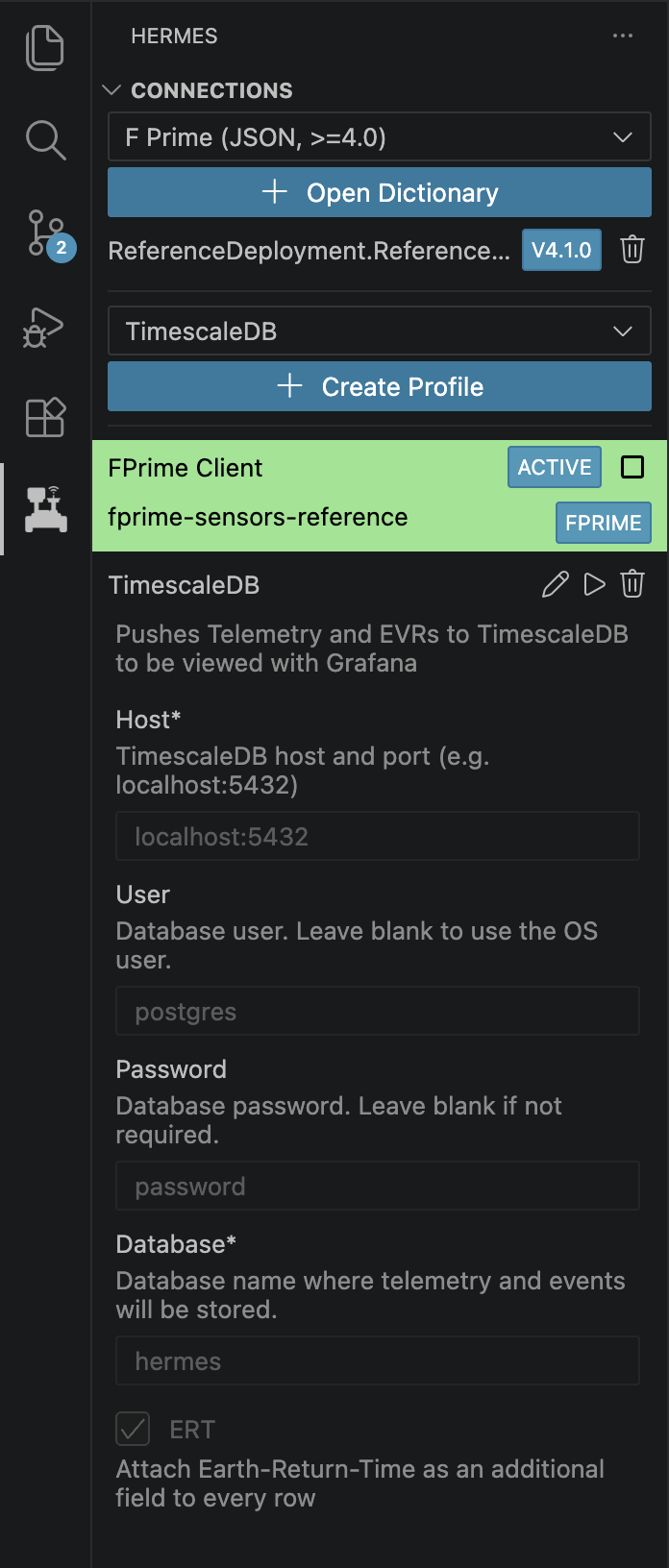
- Connect the backend to the database with a TimescaleDB profile from the Hermes VS Code extension (if you are using the Hermes backend). Create a new TimescaleDB Profile and fill out the information. The default values can be found in the accompanying screenshot. Once you have both the flight software connection and the TimescaleDB connection, telemetry and events should be flowing into the database and should be visible in Grafana at
localhost:3000. - Push data to the database through some other means. The database is available at
localhost:5432.
Grafana Plugin
Next, head over to the Grafana page for instructions on how to install (if applicable) and use the Grafana plugin.
Custom TimescaleDB Instance (Not Using Hermes Docker Compose)
Note
This step is not needed if connecting via the profile shown above.
Hermes also offers utilities to manually connect a local hermes backend to a TimescaleDB instance. In this example, we connect a local hermes backend to a local TimescaleDB instance. First, we start a local TimescaleDB instance via docker at localhost:5432 with password password. Then, we can start the Hermes backend in local mode with hermes.host.bind set to:
Now, we can run the Hermes utility to connect the backend to the database. Compile and execute the code found in hermes/cmd/sqlrecord with the following command:
Documentation In Progress
This documentation is incomplete while we are migrating from our internal documentation store to the public GitHub.