Overview
Kamodo provides a functional interface for space weather analysis, visualization, and knowledge discovery, allowing many problems in scientific data analysis to be posed in terms of function composition and evaluation. We'll walk through its general features here.
Kamodo objects
Users primarily interact with models and data through Kamodo objects.
from kamodo import Kamodo
Function registration
Kamodo objects are essentially python dictionaries storing variable symbols as keys and their interpolating functions as values. New functions may be registered either at the initialization of the Kamodo object or later using dictionary bracket syntax.
kamodo = Kamodo(f = 'x**2')
kamodo
kamodo.f(3)
9
kamodo = Kamodo('$x = t^2$')
kamodo['g'] = 'y-1'
kamodo
kamodo.g(3)
2
Function composition
Kamodo automatically composes functions through specifying on the right-hand-side.
kamodo['f'] = 'g(x)'
kamodo
Here we have defined two functions $x(t)$, $g(y)$, and the composition $g∘f$. Kamodo was able to determine that $f$ is implicitly a function of $t$ even though we did not say so in $f$'s declaration.
Function evaluation
Kamodo uses sympy's lambdify function to turn the above equations into highly optimized functions for numerical evaluation. We may evaluate $f(t)$ for $t=3$ using "dot" notation:
kamodo.f(3)
8
help(kamodo.g)
Help on function _lambdifygenerated:

_lambdifygenerated(y)
    Created with lambdify. Signature:

    func(y)

    Expression:

    y - 1

    Source code:

    def _lambdifygenerated(y):
        return (y - 1)


    Imported modules:
where the return type is a numpy array. We could also have passed in a numpy array and the result shares the same shape:
import numpy as np
t = np.linspace(-5, 5, 100000)
result = kamodo.f(t)
assert(t.shape == result.shape)
Unit conversion
Kamodo automatically handles unit conversions. Simply declare units on the left-hand-side of expressions using bracket notation.
kamodo = Kamodo('mass[kg] = x', 'vol[m^3] = y')
kamodo
Unless specified, Kamodo will assign the units for newly defined variables:
kamodo['rho'] = 'mass/vol'
kamodo
We may override the default behavior by simply naming the our chosen units in the left hand side.
kamodo['rho(x,y)[g/cm^3]'] = 'mass/vol'
kamodo
!!! note Kamodo will raise an error if the left and right-hand-side units are incompatible.
Even though generated functions are unitless, the units are clearly displayed on the lhs. We think this is a good trade-off between performance and legibility.
kamodo.detail()
| symbol | units | lhs | rhs | arg_units | |
|---|---|---|---|---|---|
| mass | mass(x) | kg | mass | x | {} |
| vol | vol(y) | m**3 | vol | y | {} |
| rho | rho(x, y) | g/cm**3 | rho(x, y) | mass(x)/(1000*vol(y)) | {'x': 'cm**(-3)', 'y': 'g'} |
kamodo.rho(3,4)
0.00075
We can verify that kamodo produces the correct output upon evaluation.
assert(kamodo.rho(3,8) == (3*1000.)/(8*100**3))
Variable naming conventions
Kamodo allows for a wide array of variable names to suite your problem space, including greek, subscripts, superscripts.
kamodo = Kamodo(
    'rho = ALPHA+BETA+GAMMA',
    'rvec = t',
    'fprime = x',
    'xvec_i = xvec_iminus1 + 1',
    'F__gravity = G*M*m/R**2',
)
kamodo
For more details on variable naming conventions, see the Syntax section.
Lambda functions
Kamodo borrows heavily from functional programing techniques, including use of the "lambda" function, an abstract representation of a function. Think of the lambda as a placeholder when no closed-form expression may be given for a registered function.
In the example below, the function rho contains an implementation which may be hidden from the end user. In this case, it simply hands the argument off to another library.
def rho(x):
    return np.sin(x)
When registering the above function as part of a Kamodo object, Kamodo will assign the greek letter $\rho$ to the left-hand-side following the Syntax Conventions. For the right hand side the generic $\lambda(x)$ is used to signify that no closed-form expression is available.
Kamodo(rho = rho)
If a function author wishes to provide a placeholder expression for the right-hand-side, they may do so using the @kamodofy decorator below.
@kamodofy Decorator
Many functions can not be written as simple mathematical expressions - they could represent simulation output or observational data. For this reason, we provide a @kamodofy decorator, which turns any callable function into a kamodo-compatible variable and adds metadata that enables unit conversion.
from kamodo import kamodofy, Kamodo
import numpy as np

@kamodofy(units = 'kg/m**3', citation = 'Bob et. al, 2018', equation='x+y')
def rho(x = np.array([3,4,5]), y = np.array([1,2,3])):
    """A function that computes density"""
    return x+y

kamodo = Kamodo(rho = rho)
kamodo['den[g/cm^3]'] = 'rho'
kamodo
kamodo.den(3,4)
0.007
kamodo.rho.meta # PyHC standard
{'units': 'kg/m**3',
 'arg_units': None,
 'citation': 'Bob et. al, 2018',
 'equation': 'x+y',
 'hidden_args': []}
kamodo.rho()
array([4, 6, 8])
kamodo.rho.data # PyHC standard
array([4, 6, 8])
Original function doc strings and signatures passed through
help(kamodo.rho)
Help on function rho in module __main__:

rho(x=array([3, 4, 5]), y=array([1, 2, 3]))
    A function that computes density

    citation: Bob et. al, 2018
kamodo.detail()
| symbol | units | lhs | rhs | arg_units | |
|---|---|---|---|---|---|
| rho | rho(x, y) | kg/m**3 | rho | x+y | None |
| den | den(x, y) | g/cm**3 | den | rho(x, y)/1000 | {} |
Visualization
Kamodo graphs are generated directly from function signatures by examining the structure of both output and input arguments.
from plotting import plot_types
plot_types
| plot_type | function | ||
|---|---|---|---|
| out_shape | arg_shapes | ||
| (1,) | ((N, M), (N, M), (N, M)) | 3d-parametric | plotting.surface |
| (N,) | ((N,),) | 1d-line | plotting.line_plot |
| ((N,), (N,)) | 2d-line-scalar | plotting.line_plot | |
| ((N,), (N,), (N,)) | 3d-line-scalar | plotting.line_plot | |
| ((N, 3),) | 3d scatter | plotting.scatter_plot | |
| (N, 2) | ((N,),) | 2d-line | plotting.line_plot |
| ((N, 2),) | 2d-vector | plotting.vector_plot | |
| (N, 3) | ((N,),) | 3d-line | plotting.line_plot |
| ((N, 3),) | 3d-vector | plotting.vector_plot | |
| ((M,), (M,), (M,)) | 3d-tri-surface | plotting.tri_surface_plot | |
| (N, N) | ((N,), (N,)) | 2d-contour | plotting.contour_plot |
| (N, M) | ((N,), (M,)) | 2d-contour | plotting.contour_plot |
| ((M,), (N,)) | 2d-contour | plotting.contour_plot | |
| ((N, M), (N, M)) | 2d-contour-skew | plotting.contour_plot | |
| ((N, M), (N, M), (N, M)) | 3d-parametric-scalar | plotting.surface | |
| ((1,), (N, M), (N, M)) | 3d-plane | plotting.plane | |
| ((N, M), (1,), (N, M)) | 3d-plane | plotting.plane | |
| ((N, M), (N, M), (1,)) | 3d-plane | plotting.plane | |
| (N, 1, M) | ((N,), (1,), (M,)) | 3d-plane | plotting.plane |
| ((1,), (N,), (M,)) | 3d-plane | plotting.plane | |
| (1, N, M) | ((N,), (1,), (M,)) | 3d-plane | plotting.plane |
| (N, M, 1) | ((1,), (N,), (M,)) | 3d-plane | plotting.plane |
| ((N,), (1,), (M,)) | 3d-plane | plotting.plane | |
| ((N,), (M,), (1,)) | 3d-plane | plotting.plane | |
| ((M,), (N,), (1,)) | 3d-plane | plotting.plane | |
| (N, M, 3) | ((N,), (M,)) | image | plotting.image |
Kamodo uses plotly for visualization, enabling a rich array of interactive graphs and easy web deployment.
import plotly.io as pio

pio.renderers.default = 'iframe'  # For rendering in jupyter notebook
@kamodofy(units = 'kg/m^3')
def rho(x = np.linspace(0,1, 20), y = np.linspace(-1, 1, 40)):
    """A function that computes density"""
    x_, y_ = np.meshgrid(x,y)
    return x_*y_

kamodo = Kamodo(rho = rho)
kamodo
We will generate an image of this function using plotly
fig = kamodo.plot('rho')
# pio.write_image(fig, 'images/Kamodo_fig1.svg')
# fig
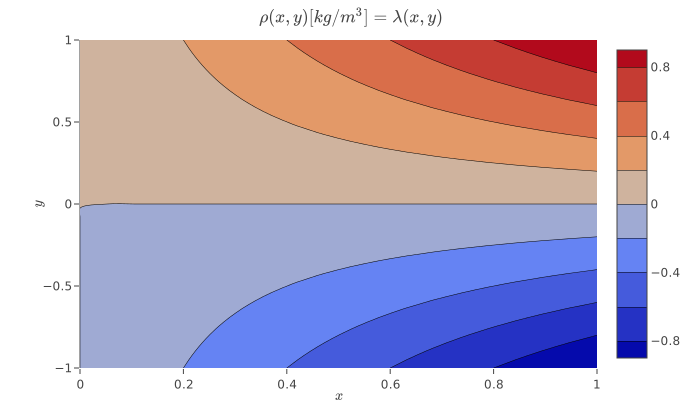
See the Visualization section for detailed examples.
Latex I/O
Even though math is the language of physics, most scientific analysis software requires you to learn new programing languages. Kamodo allows users to write their mathematical expressions in LaTeX, a typesetting language most scientists already know:
kamodo = Kamodo('$rho[kg/m^3] = x^3$', '$v[cm/s] = y^2$')
kamodo['p[Pa]'] = '$\\rho v^2$'
kamodo
The resulting equation set may also be exported as a LaTeX string for use in publications:
print(kamodo.to_latex() + '\n')
\begin{equation}\rho{\left(x \right)}[\frac{kg}{m^{3}}] = x^{3}\end{equation} \begin{equation}v{\left(y \right)}[cm / s] = y^{2}\end{equation} \begin{equation}p{\left(x,y \right)}[Pa] = \frac{\rho{\left(x \right)} v^{2}{\left(y \right)}}{10000}\end{equation}
Simulation api
Kamodo offers a simple api for functions composed of each other.
Define variables as usual (order matters).
kamodo = Kamodo()
kamodo['y_iplus1'] = 'x_i + 1'
kamodo['x_iplus1'] = 'y_i - 2'
kamodo
Now add the update attribute to map functions onto arguments.
kamodo.x_iplus1.update = 'x_i'
kamodo.y_iplus1.update = 'y_i'
Create a simulation with initial conditions
simulation = kamodo.simulate(x_i = 0, steps = 5)
simulation #an iterator of arg, val dictionaries
<generator object simulate at 0x12f9e8350>
Run the simulation by iterating through the generator.
import pandas as pd
pd.DataFrame(simulation) # pandas conveniently iterates the results for display
| y_i | x_i | |
|---|---|---|
| 0 | NaN | 0 |
| 1 | 1.0 | -1 |
| 2 | 0.0 | -2 |
| 3 | -1.0 | -3 |
| 4 | -2.0 | -4 |
| 5 | -3.0 | -5 |